This project is scheduled for launch
Launch date: Monday, November 9, 2026 at 08:00 AM UTC
Scheduled
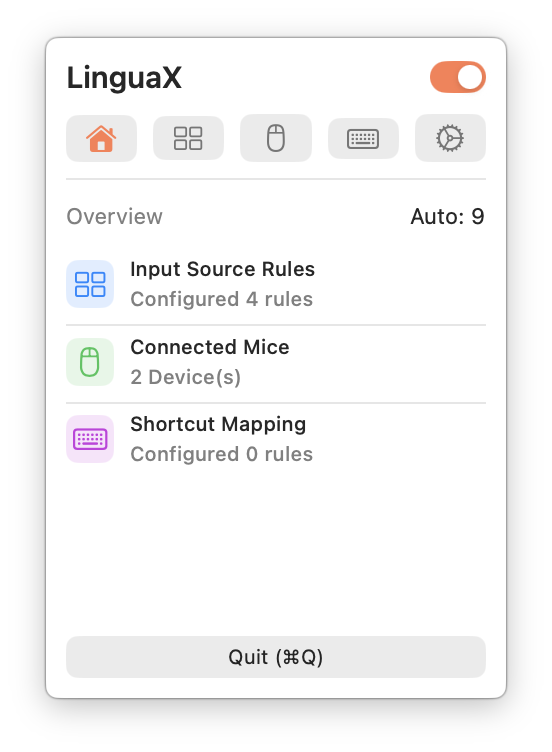
Overview
LinguaX is a powerful macOS utility designed to enhance mouse control and streamline input automation, making your daily computing experience smoother and more focused. It primarily targets macOS users, especially those with third-party mice, developers, designers, and multilingual individuals seeking to eliminate daily friction and context-switching interruptions.Key Features
- Mouse+ Enhancement: Provides smoother scrolling, reliable button/gesture mapping, and app-specific behavior for third-party mice.
- Input Automation: Automatically switches input sources by application and website domain, reducing typing interruptions.
- Per-App Overrides: Customize mouse behavior and input rules for specific applications to suit unique workflows.
- Local-First Operation: Core automation runs locally, ensuring privacy and keeping your rules on-device with optional iCloud sync.
- Low-Pressure Pricing: Offers a 30-day full-feature trial followed by a one-time lifetime purchase.
- Built for Modern macOS: Designed for macOS 13+ on Apple Silicon and Intel, with menu bar style background behavior.
Use Cases
LinguaX is invaluable for individuals struggling with inconsistent mouse behavior across different applications. For instance, users can fix choppy scrolling on their third-party mice, map side buttons to specific actions, or find a robust alternative to tools like Logi Options+. This ensures a consistent and efficient mouse experience, regardless of the application in use. Beyond mouse control, LinguaX significantly benefits multilingual users or anyone who frequently switches between different input contexts. It automates the process of changing input sources based on the active application or even the specific website domain, preventing common typing interruptions and allowing users to maintain focus without manual intervention. Developers, designers, and operators who rely on repeatable mouse and keyboard actions will find their workflows greatly improved by LinguaX's ability to stabilize input and reduce cognitive load.Pricing Information
LinguaX offers a generous 30-day full-feature trial, allowing users to experience its benefits without commitment. After the trial, a one-time lifetime purchase is available for $9.9, providing clear value and a low-pressure upgrade path.User Experience and Support
The application is designed for ease of use, enabling most users to achieve a useful initial setup within minutes. It emphasizes a "start small, feel the difference quickly" approach, encouraging users to gradually implement improvements. LinguaX includes built-in diagnostics and changelog-driven updates to help debug edge cases and maintain long-term stability, ensuring a reliable and maintainable setup.Technical Details
LinguaX is specifically built for modern macOS environments, supporting macOS 13+ on both Apple Silicon and Intel processors. Its architecture prioritizes local-first behavior, meaning core automation and user rules reside on the device, enhancing privacy. Optional iCloud sync is available for rule synchronization across devices.Pros and Cons
- Pros:
- Significantly improves third-party mouse feel and reliability on macOS.
- Automates input switching, reducing context-switch errors and interruptions.
- One-time purchase model offers excellent long-term value.
- Local-first design ensures user privacy.
- Designed for easy setup and gradual adoption.
- Cons:
- Exclusively for macOS users.
- May require some initial configuration for advanced per-app overrides.
Conclusion
LinguaX offers a comprehensive solution for macOS users seeking to optimize their mouse experience and eliminate input-related interruptions. By providing smooth scrolling, reliable button mapping, and intelligent input automation, it helps users maintain focus and improve productivity. Start your free trial today to experience a more natural and uninterrupted workflow on your Mac.Comments
Comments will be available once the project is launched.
Publisher
Launch Date2026-11-09
Platformdesktop
Pricingpaid
Tech Stack
#macOS
Sponsors

AIChatOne
All-in-one AI assistant with the most advanced AI models to help you Chat, Search, Write, Read and more.

Fismbot
Grow your business with Fismbot: AI social content and email tools, plus expert support for marketing, websites and technology that works for you.
Become a Sponsor
Get your brand featured here
Outbid
View🥇 🥈
🥈 🥉
🥉
Want this spot? Pay what you wantBest Launch Directories: launch directories with DR, traffic and pricing
Launch directories, product launch platforms and startup listing sites in one table, with Domain Rating by Ahrefs, traffic where known, pricing and link type for each.
$50
Boost Your Domain Rating — DoFollow Backlinks (DR 30–70) from $30
Raise your Ahrefs Domain Rating with 5 - 50 dofollow backlinks from DR 30–60 sites — from $50, guaranteed to improve your DR or your money back.
$45
DirEasy - The Best Directory Boilerplate with AI | DirEasy
The best directory boilerplate, packed with AI, Listings, Payment, Submission, CMS, Blog, Authentication, Newsletter, SEO and more.
$41