AONMeetings Review - Affordable Browser-Based Video Conferencing with Enterprise Security
Welcome to our AONMeetings review!
Remember the first time you used Zoom or Teams and spent minutes downloading and installing? That's not how meetings should start. With our platform, just click a browser link and join instantly.
Let's explore this secure, browser-based video conferencing and webinar platform.
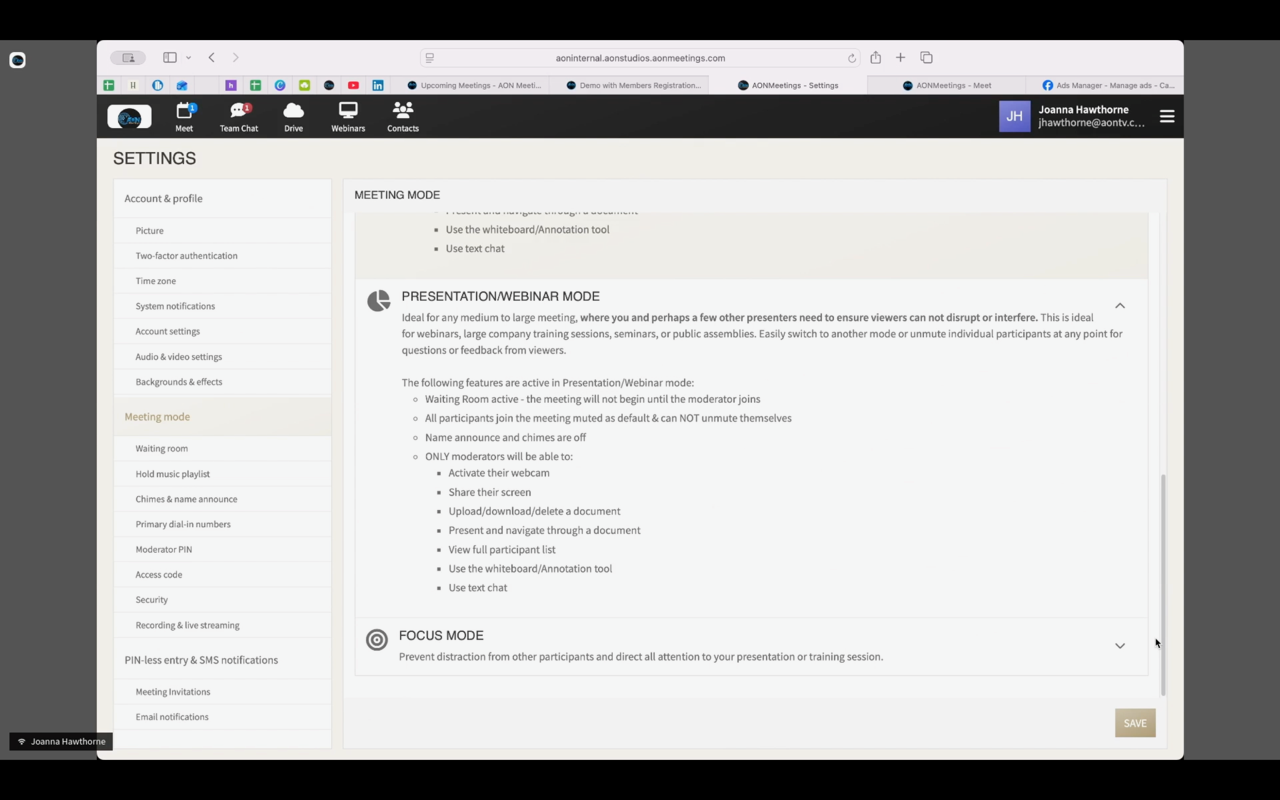
AONMeetings delivers HD video meetings, unlimited webinars, screen sharing, recording, and collaboration tools—all from a secure, browser-based platform with no downloads required. With HIPAA compliance, enterprise-grade encryption, and pricing starting at just $3.99/user per month, AONMeetings makes professional-grade video conferencing accessible to everyone.
The Problem AONMeetings Solves
Traditional video conferencing platforms have several critical limitations:
- Download Barriers: Most solutions require app installations and software updates, creating friction for participants and technical support burdens for IT teams
- Hidden Webinar Fees: Many platforms charge extra for webinar features or limit webinars to expensive enterprise tiers
- Security Concerns: Consumer-grade platforms often lack HIPAA compliance and enterprise-grade encryption needed for healthcare, legal, and financial communications
- Unpredictable Pricing: Time limits, participant caps, and hidden fees make budgeting difficult for businesses and organizations
- Complex Setup: Overwhelming interfaces and complex configurations slow down adoption and increase training requirements
- Accessibility Issues: Participants struggle with compatibility across devices, browsers, and operating systems
AONMeetings addresses these pain points by providing a browser-based solution that's secure, simple to use, and affordable—without sacrificing professional features or enterprise-grade security.
Why Choose AONMeetings?
- 🌐 Browser-Based Access: No downloads or installations required—join meetings instantly from any browser
- 🔐 HIPAA Compliant: Enterprise-grade security with end-to-end encryption for healthcare and sensitive industries
- 🎥 HD Video & Audio: Crystal-clear communication powered by WebRTC technology
- 📹 Unlimited Webinars: Host unlimited webinars with every plan—no extra fees for webinar features
- 💰 Affordable Pricing: Plans starting at $3.99/user per month with a 30-day money-back guarantee
- 🤖 AI-Powered Features: Smart meeting summaries, closed captioning, and intelligent search capabilities
- 📊 Advanced Collaboration: Screen sharing, annotations, whiteboard, document sharing, and real-time chat
- 📡 Live Streaming: Stream to YouTube, custom RTMP endpoints, and social media platforms
- ⏱️ Unlimited Meeting Time: No time limits—meet as long as you need
- 📅 Smart Scheduling: Calendar integration, automated reminders, and Calendly integration
- 📱 Mobile Optimized: Responsive design works perfectly on smartphones and tablets
- 🎨 Custom Branding: Professional customization options for Business Pro plans
Core Features Explained: The Heart of Our Review
Browser-Based Video Conferencing
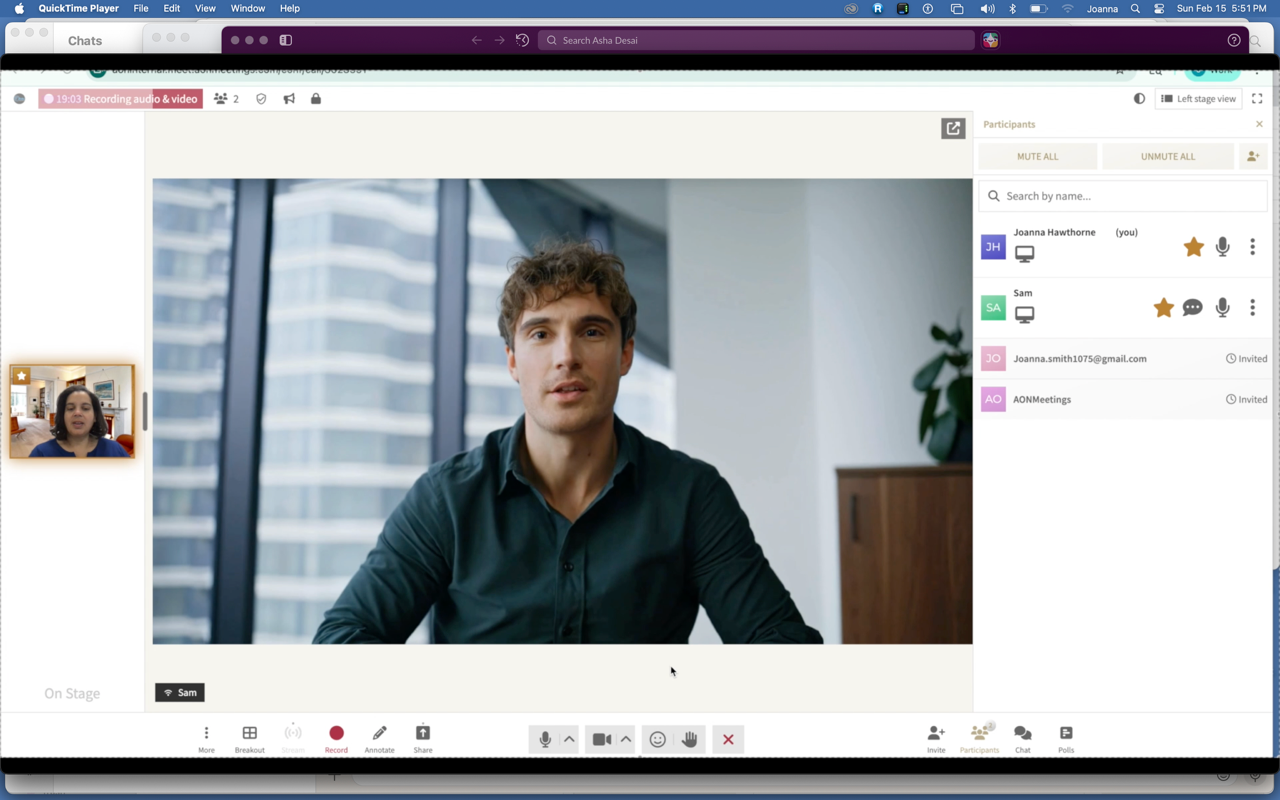
How Browser-Based Access Works
Joining meetings is effortless:
- Click Meeting Link: Participants receive a secure meeting URL
- Join Instantly: No app installation or account required—access directly from any modern browser
- Cross-Platform Compatible: Works seamlessly across Windows, Mac, Linux, iOS, and Android devices
- Instant Updates: Always running the latest version—no software updates or compatibility issues
Why Browser-First Matters
The no-download approach delivers significant advantages:
- Zero Friction Join: Participants join meetings in seconds without technical hurdles
- IT Simplicity: No software deployment, updates, or compatibility management
- Universal Access: Works on any device with a browser—perfect for bring-your-own-device environments
- Security: Reduced attack surface without installed applications
- Guest-Friendly: Clients, partners, and students can join without creating accounts
Jennifer W., a Real Estate Consultant at eXp Realty, highlights this advantage: "I like the fact that no app needs to be downloaded to access the meetings! This is one of my favorite features."
Ideal for: Real estate professionals, consultants, healthcare providers, educators, and anyone who needs frictionless meeting access for clients or participants.
Enterprise Security & HIPAA Compliance
HIPAA Compliance Features
Healthcare providers and organizations handling sensitive data benefit from:
- HIPAA Business Associate Agreement: Available for healthcare customers
- End-to-End Encryption: All communications encrypted using industry-standard protocols
- SOC 2 Type II Compliant: Meets rigorous security standards for enterprise customers
- GDPR Compliant: Full compliance with European data protection regulations
- SSL/TLS Encryption: Secure data transmission for all communications
Advanced Access Controls
Complete meeting security with granular controls:
- Waiting Room: Screen and admit participants before they join
- Meeting Lock: Prevent unauthorized access after meetings start
- Access Codes: Require passcodes for additional security
- Moderator Controls: Full host control over meeting security settings
- One-Time Access Codes: Generate secure, single-use codes for sensitive meetings
Jacquelyn S., CEO of Seymour Consulting, notes: "This platform is very user friendly, the platform price point is very reasonable and is HIPAA compliant."
Meena A., an Employee Relations Manager, adds: "AONMeetings Makes Sensitive Conversations Simple and Secure."
Ideal for: Healthcare providers, legal professionals, financial services, government agencies, and any industry requiring secure communications.
Professional Webinar Platform
Webinar Features
Host professional webinars with comprehensive capabilities:
- Unlimited Webinars: No caps on the number of webinars you can host
- Registration System: Built-in registration and attendee management
- Paid Webinars: Charge for webinar events with payment integration
- Live Polling: Engage audiences with real-time polls and surveys
- Interactive Q&A: Manage audience questions efficiently
- Live Streaming: Broadcast to YouTube, custom RTMP, and social media
- Multi-Camera Broadcast: Professional production with multiple camera angles
- Custom Branding: Add logos, colors, and branding (Business Pro plan)
Large-Scale Webinars
Scale your events with flexible add-on options:
- 500 Attendees: $54.99/month or $60 one-time
- 1,000 Attendees: $239.99/month or $300 one-time
- 3,000 Attendees: $712.99/month or $800 one-time
- 5,000 Attendees: $1,799.99/month or $1,900 one-time
All large webinars include chat capabilities, registration, and live interaction tools.
Ideal for: Training organizations, marketing teams, educational institutions, and businesses running virtual events.
AI-Powered Meeting Features
AI Meeting Summaries
Transform recorded meetings into actionable insights:
- Automated Summaries: AI generates concise meeting summaries automatically
- Key Points Extraction: Identify and highlight important discussion points
- Action Items: Automatically capture tasks and decisions
- Speaker Identification: Attribute contributions to specific participants
Smart Search & Insights
Find information quickly across all your meetings:
- Searchable Transcripts: Full-text search across meeting recordings
- Topic Detection: AI identifies and organizes content by topic
- Meeting Analytics: Gain insights into engagement and participation patterns
- Content Organization: Automatically categorize and tag meeting content
Maya J., a Performance Manager, confirms the value: "Clear Weekly Reviews with Great Screen Sharing and AI Summaries."
Closed Captioning
Improve accessibility and comprehension:
- Real-Time Captions: Generate live captions during meetings
- Multi-Language Support: Captioning available in multiple languages
- Export Capability: Download captions for documentation and compliance
Ideal for: Corporate training, educational institutions, team reviews, and organizations focused on accessibility.
Advanced Collaboration Tools
Screen Sharing & Annotations
Share content and collaborate visually:
- Screen Sharing: Share your entire screen, application windows, or browser tabs
- Annotations: Draw, highlight, and add notes directly on shared screens (Pro and above)
- Whiteboard: Interactive whiteboard for brainstorming and visual planning
- Multi-Presenter: Multiple participants can share screens during meetings
- Web Cam While Screen Share: Maintain face-to-face connection while presenting (Pro and above)
Document Sharing
Share files and resources seamlessly:
- Document Sharing: Upload and share files during meetings
- Content Popup: Highlight important documents and resources
- File Storage: 1 GB of storage included with Standard plan
Real-Time Communication
Stay connected during meetings:
- Team Chat: Group chat with team members across multiple licenses
- Private Chat: One-on-one messaging between participants (Pro and above)
- Speaker Spotlight: Focus attention on specific speakers
- Connection Tools: Comprehensive audio and video controls
Ideal for: Team meetings, project planning, design reviews, training sessions, and collaborative work.
Smart Scheduling & Integration
Calendar Integration
Seamlessly sync with your existing workflow:
- Google Calendar Integration: Automatic sync with Google Calendar
- Outlook Integration: Connect with Microsoft Outlook
- Calendly Integration: Native Calendly integration (Business Pro)
- Automated Reminders: Ensure attendance with timely notifications
- Meeting Scheduling: Built-in tools for organizing and managing meetings
Address Book & Contact Management
Organize your contacts efficiently:
- Address Book: Store and manage participant contacts
- Instant Join: Quick access for frequent contacts
- Team Management: Organize team members by groups or departments
Ideal for: Sales teams, consultants, educators, and anyone managing regular meetings with clients or students.
Pricing Plans: Affordable Options for Every Need
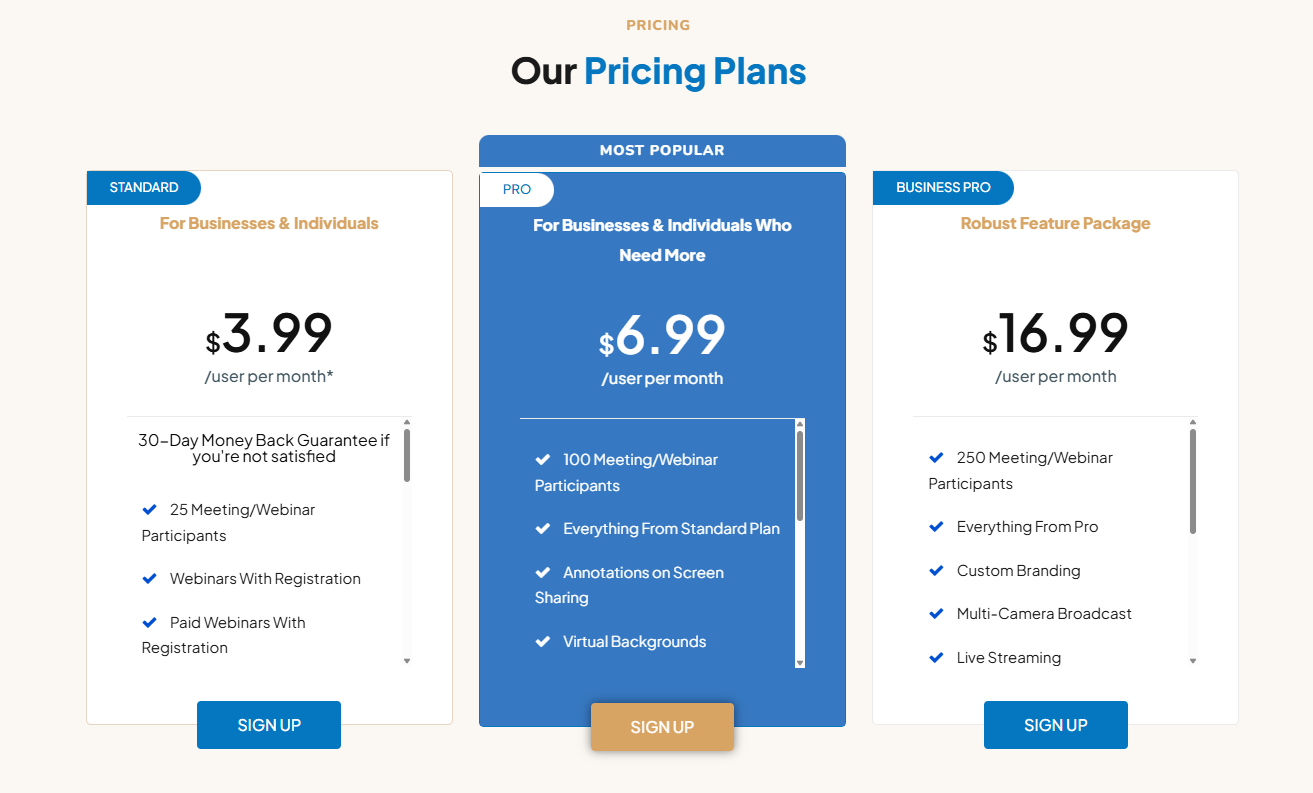
AONMeetings offers competitive pricing with no hidden fees and a 30-day money-back guarantee.
Special Launch Offer: Use code LAUNCH50 for 50% off your first month!
Standard Plan: $3.99/User Per Month
- Price: $3.99 per user per month
- Participants: Up to 25 meeting/webinar participants
- Features Included:
- HD video meetings with unlimited time
- Unlimited webinars with registration
- Paid webinars with payment integration
- Document sharing (1 GB storage)
- Screen sharing
- Live polling
- Interactive whiteboard
- Meeting scheduling
- Address book
- Waiting room with music
- Instant join
- Connection tools
- Moderator controls
- Speaker spotlight
- Audio and video recording
- Smart meeting summaries
- Smart search
- Closed captioning
- Unlimited meetings per month
- Team chat with multiple licenses
Compare to Zoom at $14.99/month—that's 73% savings with more features included. 30-day money-back guarantee. No time limits. No hidden fees.
Pro Plan: $6.99/User Per Month
- Price: $6.99 per user per month
- Participants: Up to 100 meeting/webinar participants
- Everything from Standard Plan, plus:
- Annotations on screen sharing
- Virtual backgrounds
- Content popup
- Private chat
- Meeting lock
- Custom hold music
- One-time access codes
- Call display
- Web cam while screen share
- Team chat with multiple licenses
Business Pro Plan: $16.99/User Per Month
- Price: $16.99 per user per month
- Participants: Up to 250 meeting/webinar participants
- Everything from Pro Plan, plus:
- Custom branding
- Multi-camera broadcast
- Live streaming
- Cue insights
- Calendly integration
- Gallery popover
- YouTube & custom RTMP livestreaming
- Team chat with multiple licenses
Large Webinar Add-Ons
Large Webinar Monthly
With chat capabilities, from $54.99/month:
- 500 attendees: $54.99/month
- 1,000 attendees: $239.99/month
- 3,000 attendees: $712.99/month
- 5,000 attendees: $1,799.99/month
Includes chat, polls, webinar registration, and live interaction tools.
Large Webinar One-Time
One-time fee for single events:
- 500 attendees: $60 one-time
- 1,000 attendees: $300 one-time
- 3,000 attendees: $800 one-time
- 5,000 attendees: $1,900 one-time
No recurring billing, includes chat features and one-time event use.
Enterprise Plans
- Custom Pricing: Tailored to your organization's needs
- Features: Everything in Business Pro, plus:
- Volume discounts
- Custom participant limits
- Dedicated account manager
- 24/7 priority support
- HIPAA Business Associate Agreement
- Custom integrations
- SLA guarantees
Real-World Performance
AONMeetings has achieved an impressive 4.9 out of 5 rating on G2 with over 154 verified reviews.
Key performance highlights:
- Audio-Visual Quality: Multiple verified users report consistent clarity in audio and video transmission
- Network Resilience: Maintains quality even under suboptimal bandwidth scenarios
- Unlimited Session Duration: No artificial time limitations—meet as long as you need
System Requirements and Compatibility
AONMeetings is designed for maximum accessibility:
- Browser Access: Any modern browser (Chrome, Firefox, Safari, Edge)
- Operating Systems: Windows, Mac, Linux, iOS, Android
- No Software Installation: 100% browser-based—no downloads required
- Internet Connection: Stable internet connection recommended for HD video
- Camera & Microphone: Required for video and audio participation
- Storage: 1 GB cloud storage included with Standard plan
The browser-based approach ensures universal compatibility—participants can join from any device without software installation or compatibility concerns.
How AONMeetings Stands Out From Competitors
AONMeetings differentiates itself with a focus on simplicity, security, and affordability.
Key Differentiators
- 100% Browser-Based: No downloads or installations—participants join instantly from any device
- Unlimited Webinars Included: Every plan includes unlimited webinars without extra fees
- HIPAA Compliance: Enterprise-grade security with HIPAA compliance and end-to-end encryption
- AI-Powered Features: Smart summaries, search, and closed captioning included
- Affordable Pricing: Plans starting at $3.99/user per month—significantly below competitors
- No Time Limits: Meet for as long as you need without time restrictions
- Live Streaming: Built-in YouTube and RTMP streaming for Business Pro users
- 30-Day Money-Back Guarantee: Risk-free trial to experience the platform
Competitive Analysis
AONMeetings compares favorably against leading video conferencing platforms.
| Feature | AONMeetings | Zoom | Google Meet | Microsoft Teams |
|---|---|---|---|---|
| Browser-Based Access | ✅ Yes | ❌ Requires App | ✅ Yes | ❌ Requires App |
| No Downloads Required | ✅ Yes | ❌ No | ✅ Yes | ❌ No |
| End-to-End Encryption | ✅ Yes | ✅ Paid Plans | ❌ No | ❌ No |
| Unlimited Webinars Included | ✅ All Plans | ❌ Paid | ❌ No | ❌ Paid |
| AI Meeting Summaries | ✅ Included | ❌ No | ❌ No | ❌ No |
| AI-Powered Transcriptions | ✅ Included | ✅ Paid | ❌ No | ✅ Paid |
| Smart Search for Recordings | ✅ Yes | ❌ No | ❌ No | ❌ No |
| Sentiment Analysis | ✅ Yes | ❌ No | ❌ No | ❌ No |
| Live Streaming Included | ✅ Business Pro | ❌ Paid | ❌ Paid | ❌ Paid |
| One-Time Access Codes | ✅ Included | ❌ No | ❌ No | ❌ No |
| Session Locks | ✅ Included | ❌ No | ❌ No | ❌ No |
| Custom Branding | ✅ Business Pro | ✅ Paid | ⚠️ Limited | ✅ Paid |
| Meeting Recording | ✅ Included | ✅ Paid | ✅ Paid | ✅ Paid |
| Cloud Storage for Recordings | ✅ Yes | ✅ Paid | ⚠️ Limited | ✅ Paid |
| Business Pro Participants | ✅ Up to 250 | Up to 100 | Up to 100 | Up to 300 |
| Enterprise Participants | ✅ Up to 250 | Up to 500 | Up to 250 | Up to 250 |
| Starting Price (per user/mo) | ✅ $3.99 | $14.99 | $12.00 | $4.00 |
| 30-Day Money-Back Guarantee | ✅ Yes | ❌ No | ❌ No | ❌ No |
Perfect For: Who Uses AONMeetings?
AONMeetings serves diverse industries and use cases:
- Small Businesses & Freelancers: Professional features at $3.99/month with no time limits and easy client access
- Healthcare Providers: HIPAA compliant platform for secure telehealth consultations
- Educators: Unlimited webinars, interactive tools, and AI summaries for virtual classes
- Remote Teams: Scalable collaboration with screen sharing and smart scheduling
- Marketing & Event Professionals: Live streaming, custom branding, and registration systems
- Consultants & Professional Services: Secure communications with client-friendly access
User Feedback Matters!
The AONMeetings team values user feedback and continuously improves the platform:
- Elijah M., Software Developer: "Professional service, software is secure, excellent meeting platform for any organization."
- Diane B., CEO: "AONMeetings offers an exceptional service that exceeds expectations in both functionality and value."
- Irina G., Client Success Manager: "Makes virtual client onboarding smoother."
Final Review Verdict: Is AONMeetings Worth It?
AONMeetings delivers exceptional value by combining enterprise-grade features with affordable pricing. Browser-based access means instant joins—no downloads, no friction. Unlimited webinars, AI features, and HIPAA compliance are included across all plans starting at just $3.99/user per month. The 30-day money-back guarantee makes it risk-free to try.
Review Summary
- Ease of Use: ⭐⭐⭐⭐⭐ (5/5)
- Browser-Based Experience: ⭐⭐⭐⭐⭐ (5/5)
- Security & Compliance: ⭐⭐⭐⭐⭐ (5/5)
- Feature Set: ⭐⭐⭐⭐⭐ (5/5)
- Webinar Capabilities: ⭐⭐⭐⭐⭐ (5/5)
- AI Features: ⭐⭐⭐⭐⭐ (5/5)
- Value for Money: ⭐⭐⭐⭐⭐ (5/5)
- Customer Support: ⭐⭐⭐⭐⭐ (5/5)
- Overall Review Score: ⭐⭐⭐⭐⭐ (5/5)
Ready to transform your meetings? 👉 Try AONMeetings for Free today and experience browser-based video conferencing with unlimited webinars, enterprise security, and AI-powered features. Join thousands of businesses who've chosen AONMeetings as their affordable Zoom alternative!
Tags
# Review# AONMeetings# Video Conferencing software# Zoom alternative# Browser based video conferencing# HIPAA compliant video conferencing# Affordable video conferencing# Webinar platform# Video meeting software# Secure video calls# Online meeting solution# No download video conferencing# Team collaboration tool# Remote work software# Virtual meeting platform# Screen sharing# Video recording# AI meeting summaries# WebRTC video conferencing# Enterprise video meetings# Small business video conferencing# Healthcare video meetings# Educational webinars# Live streaming platformJust Call AI Review - Hands-Free AI Accessible by Phone
Jam SQL Studio Review - AI-Native Cross-Platform SQL IDE for Mac, Windows, and Linux
Follow for new blogs
Subscribe to our blog
Subscribe to Newsletter
Subscribe to our newsletter to get the best products weekly.