Jam SQL Studio Review - AI-Native Cross-Platform SQL IDE for Mac, Windows, and Linux
Welcome to our comprehensive Jam SQL Studio review! As Microsoft prepares to retire Azure Data Studio in February 2026, developers, DBAs, and data engineers are seeking modern alternatives that fill the gap—especially on macOS and Linux where native SQL tooling has been limited.
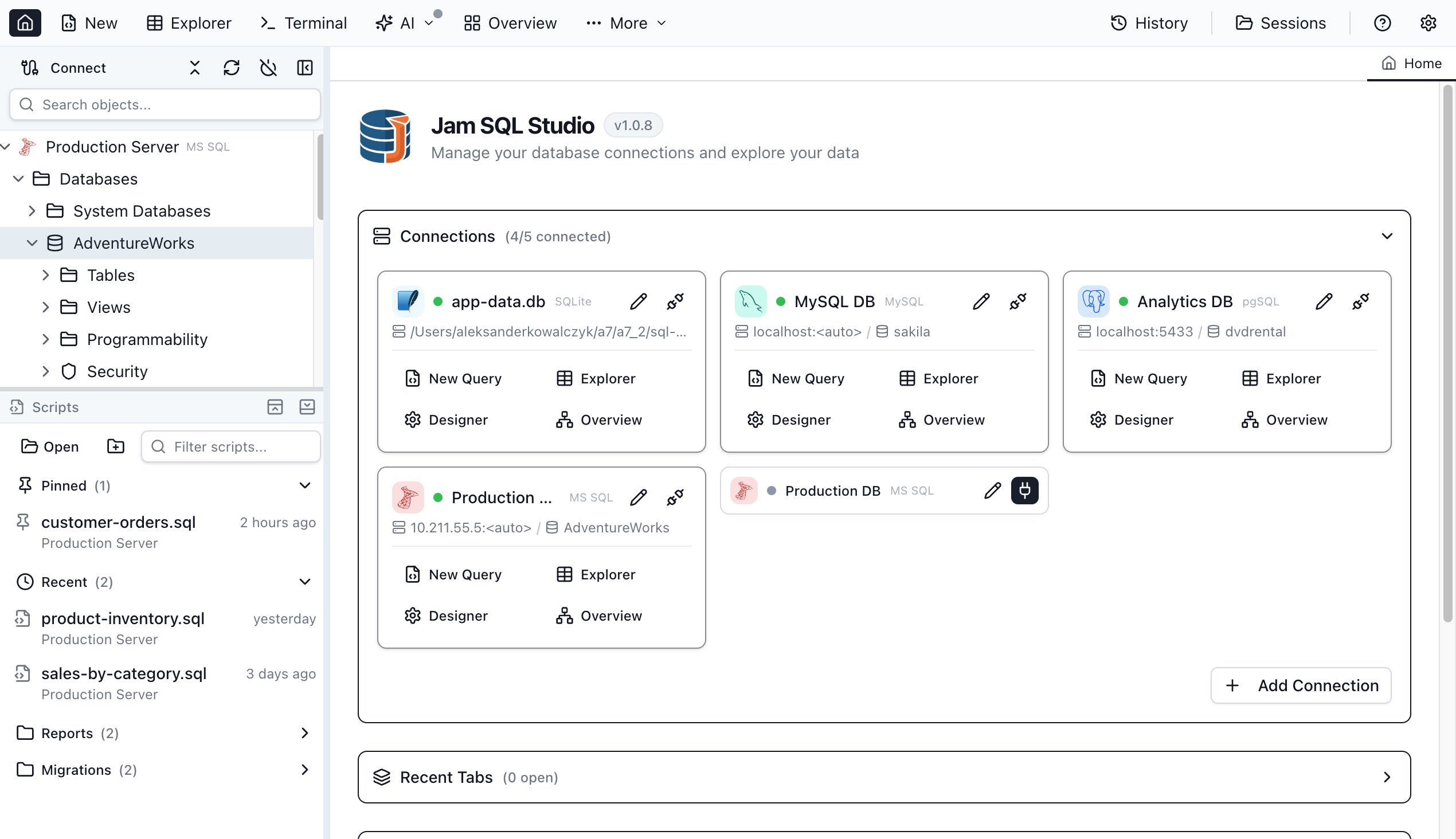
Jam SQL Studio emerges as an AI-native, cross-platform SQL IDE built from the ground up for modern database development workflows. Unlike traditional SQL clients that feel dated and disconnected from contemporary development practices, Jam SQL Studio integrates seamlessly with AI coding assistants through a built-in MCP (Model Context Protocol) server, offers professional-grade features like schema compare and execution plan visualization, and provides first-class support for macOS, Windows, and Linux.
The result? A professional SQL client that doesn't force you to choose between cross-platform compatibility and enterprise features.
In this review, we'll explore how Jam SQL Studio positions itself as the definitive Azure Data Studio alternative for developers who need AI-powered productivity, comprehensive database tooling, and a modern, responsive interface.
The Problem Jam SQL Studio Solves
The SQL development landscape has several significant gaps:
- Azure Data Studio Retirement: Microsoft is retiring Azure Data Studio on February 28, 2026, leaving millions without their preferred cross-platform SQL tool
- Mac and Linux Limitations: SSMS remains Windows-only, forcing Mac and Linux users to rely on remote desktop or less capable alternatives
- Outdated Development Experiences: Traditional SQL clients lack AI autocomplete, notebooks, and AI assistant integration
- Enterprise Features Costly: Schema compare, data compare, and execution plans are locked behind expensive enterprise subscriptions
- AI Integration Gaps: Most SQL clients don't offer secure, structured integration with AI coding assistants via MCP
- Performance Overhead: Many cross-platform clients suffer from slow startup and resource-intensive architectures
Jam SQL Studio addresses these challenges with an AI-native, cross-platform SQL IDE that includes professional features without requiring multiple subscriptions.
Why Choose Jam SQL Studio?
- ✨ AI-Native Architecture: Built-in MCP server with 13 tools and 9 resources for seamless integration with Claude, Copilot, and other AI coding assistants
- 🗣️ Natural Language to SQL: Describe queries in plain English and let AI transform them into SQL syntax
- 🎨 Built-in Charting: Create bar, line, pie, area, and scatter charts directly from query results
- 📓 SQL Notebooks: Jupyter-compatible .ipynb notebooks combining SQL queries with JavaScript cells and Markdown documentation
- ⚡ Smart IntelliSense: Context-aware code completion with real-time syntax and semantic error checking for tables, columns, functions, and keywords
- 📊 Execution Plan Visualization: Visualize query execution plans with tree and graph views, compare plans side-by-side, and identify performance bottlenecks
- ⚖️ Schema and Data Compare: Professional-grade comparison tools typically found only in expensive enterprise database suites
- 🗺️ Visual Schema Overview: Interactive graph visualization showing tables, views, procedures, and functions with foreign key relationships rendered as arrows
- 🤖 AI Workspace Sync: Query tabs sync to .sql files with auto-generated context files (schema, history, results) for AI agents
- 🔗 Cross-Platform Support: Native desktop applications for macOS, Windows, and Linux with consistent feature parity across all platforms
- 🗄️ Multi-Database Support: Full support for SQL Server, PostgreSQL, MySQL, MariaDB, SQLite, and Azure SQL with IntelliSense for each engine
- 🎨 Modern Interface: Clean, responsive UI with dark mode support, semantic theming, and familiar keyboard shortcuts from SSMS and Azure Data Studio
- 🆓 Free Personal Tier: Unlimited SQL Server, PostgreSQL, and MySQL connections with core features available forever without requiring an account
- 💰 Transparent Pricing: Pro features available at $9.99/month or $99/year with a 14-day free trial, no credit card required
- 💻 Command-Line CLI: Execute SQL queries from any terminal with jam-sql CLI tool
- 🔄 Session Persistence: Automatic workspace saving—resume exactly where you left off
Core Features Explained: The Heart of Our Review
AI-Native Tooling: MCP Server and AI Workspace
Jam SQL Studio distinguishes itself as the first SQL IDE designed from the ground up for AI coding assistants.
Built-in MCP Server
The desktop application runs a local MCP (Model Context Protocol) server that enables external AI tools to safely interact with your databases:
- 13 MCP Tools: Query execution, UI control, table viewer operations, and more
- 9 MCP Resources: Workspace snapshots, connection status, editor content, query results, and application capabilities
- Secure by Default: Server binds to 127.0.0.1 only, requires bearer token authentication, and enforces read-only queries by default
- Policy Controls: Configurable policy levels (block, confirm, allow) with full audit logging of every tool call
- No Password Exposure: Connections list reveals no secrets—agents see connection names without credentials
The MCP server allows AI coding assistants like Claude Desktop, Claude Code, GitHub Copilot, and custom agents to list saved connections, open query tabs, write SQL to editors, and execute policy-controlled queries.
AI Workspace Inside the App
When you open an AI Workspace, Jam SQL Studio auto-generates context files that give AI agents everything needed to understand your database structure:
- Bidirectional File Sync: Query tabs sync to .sql files—AI edits files, your editor updates in real-time
- Auto-Generated Context: CLAUDE.md and AGENTS.md files provide database schema, active connections, and usage examples
- Schema Export: Database schemas exported to
.schema/directory for AI reference - Results History: Query results saved to
.history/with timestamped Markdown summaries - Knowledge Pack:
.knowledge/directory stores app manifest, capabilities, and user guide
Claude Code CLI Integration
Chat with Claude directly inside Jam SQL Studio using your local Claude Code CLI installation:
- Claude Code CLI Integrated In-App: Re-uses your existing Claude subscription and settings
- Full Database Context: @-mentions provide schema-aware conversations with your database
- No Extra API Keys: Your local Claude Code setup powers the integration—no additional subscriptions needed
- Privacy First: AI features are disabled by default. Query results history, write operations, and detailed context sharing require explicit opt-in in Settings
See What AI Agents See
The auto-generated CLAUDE.md file provides AI agents with a complete picture of your database:
# Jam SQL Studio - AI Context

## Active Connection

- Name: Production DB
- Engine: PostgreSQL 15.2
- Database: ecommerce_prod

## Database Schema

Tables: 24 | Views: 8 | Functions: 12

users (id, email, name, created_at, subscription_tier)
orders (id, user_id → users.id, total, status, created_at)
products (id, name, price, category_id → categories.id)
order_items (order_id → orders.id, product_id → products.id, qty)

## MCP Tools Available

✓ query_execute - Run read-only SQL (SELECT, EXPLAIN)
✓ connections_list - List saved connections
✓ ui_open_tab - Open query/table tabs
✓ ui_set_editor_text - Write SQL to editor
This context-aware approach enables AI agents to write accurate queries, understand relationships, and provide meaningful database assistance.
Ideal for: Teams adopting AI-assisted development, developers using Claude or other AI coding assistants, and organizations building custom AI agents that need database access.
SQL Notebooks with Jupyter Compatibility
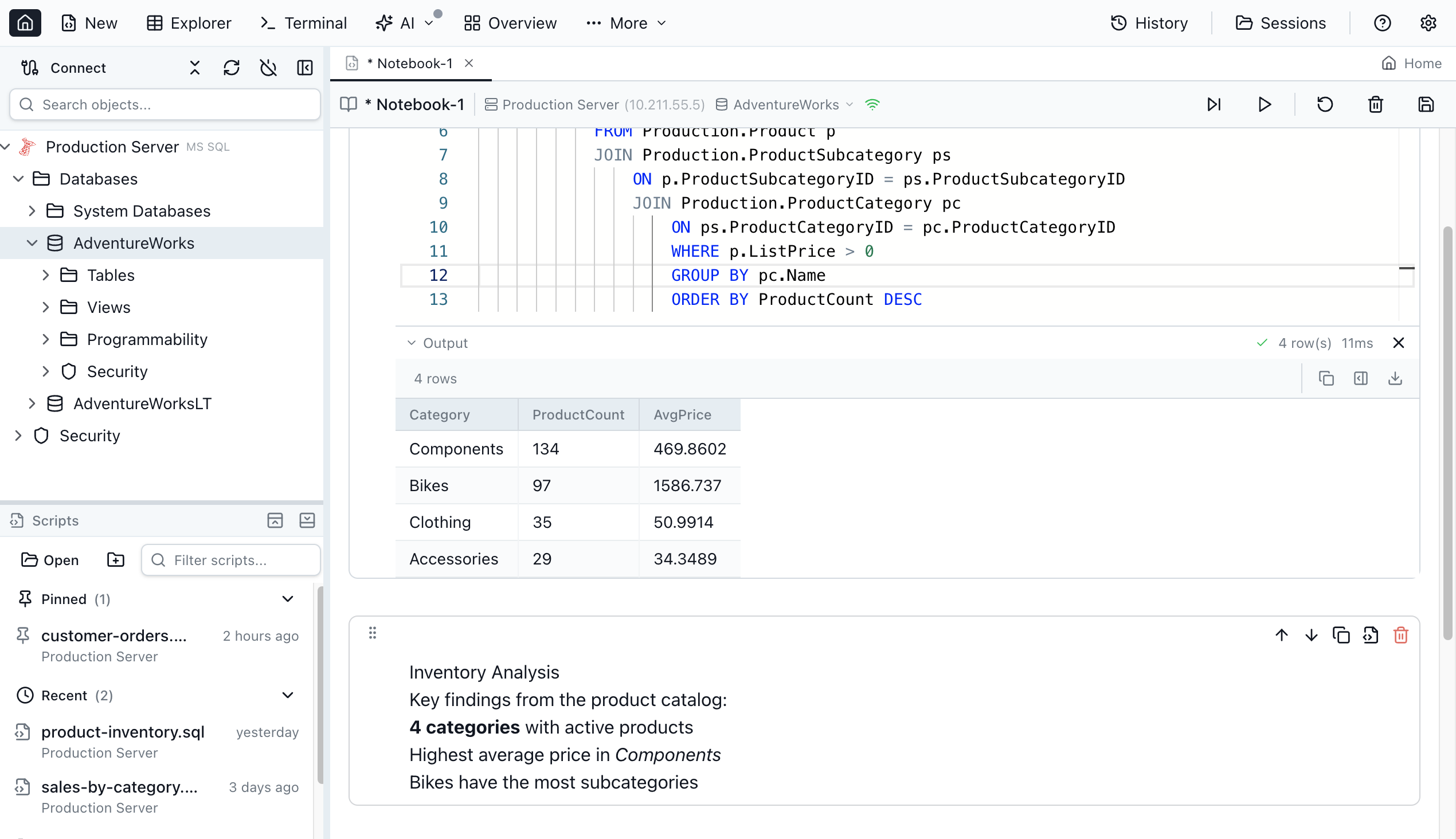
Jam SQL Studio includes full support for SQL Notebooks (.ipynb files), combining the power of SQL queries with Jupyter-style organization.
Notebook Features
- SQL and JavaScript Cells: Mix SQL queries with JavaScript for data transformation and visualization
- Markdown Documentation: Add explanatory text, methodology, and results interpretation directly in notebooks
- Inline Results: Query results display inline with execution statistics and row counts
- Shared Sessions: Variables and state persist across cells within a notebook
- Run All: Execute entire notebooks for automated reporting and data pipelines
- Export and Share: Export notebooks as .ipynb files for collaboration or version control
Use Cases for SQL Notebooks
- Data Analysis Reports: Document queries, visualizations, and insights in a single reproducible notebook
- Database Runbooks: Create operational procedures with step-by-step queries and explanations
- Onboarding Documentation: Teach new team members database schema and query patterns with executable examples
- Performance Investigations: Document query optimization work with before/after execution plans
- ETL Pipelines: Build data transformation workflows with SQL and JavaScript
This notebook functionality fills a gap left by Azure Data Studio, bringing data science-style organization to database development workflows.
Smart IntelliSense and Query Editor
The query editor provides developer-centric features that accelerate SQL writing and prevent errors.
Context-Aware Autocomplete
- Tables and Columns: IntelliSense suggests tables and columns based on your active connection
- Functions and Keywords: Engine-aware suggestions for SQL Server, PostgreSQL, and MySQL functions
- Schema Filtering: Suggestions filtered by database schema to reduce noise
- Real-Time Error Checking: Syntax and semantic errors highlighted as you type
Query Editor Features
- Query History: Access recently executed queries from any editor, never lose your work
- Tab Management: Reopen closed tabs with full context, multiple tabs with connection-specific isolation
- Transaction Management: Auto, Manual, and Smart Commit modes with one-click commit and rollback
- SQL Snippets: Built-in snippet templates for common SQL patterns, create custom snippets per database engine
- Script Management: Organize .sql files with Recent, Pinned, and Mounted Folders
Script Generation
Generate CREATE, DROP, SELECT, INSERT, UPDATE, and DELETE scripts for tables, views, and databases with engine-aware syntax for MSSQL, PostgreSQL, and MySQL.
Natural Language to SQL
Transform plain English queries into SQL using AI-powered natural language processing. Simply describe what data you need in everyday language—no SQL syntax required. Perfect for beginners and experienced developers who want to accelerate query writing.
Integrated Terminal
Built-in terminal opens in your workspace folder with connection context. Environment variables are pre-set for easy CLI access to your database. Seamlessly switch between query editing and command-line database operations without leaving the application.
Execution Plan Visualization and Performance Analysis
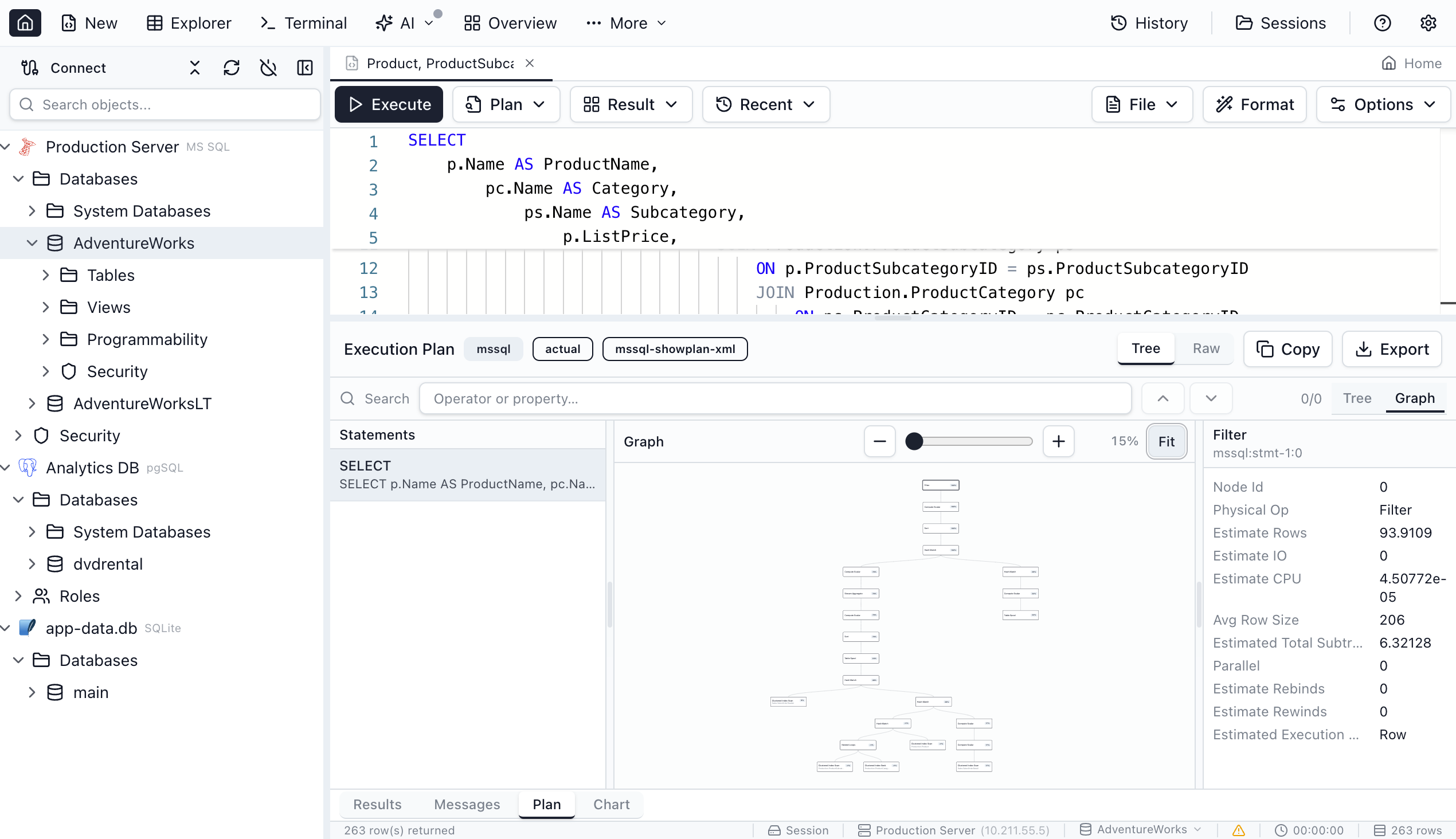
Understanding query performance is critical for database optimization, and Jam SQL Studio provides comprehensive execution plan analysis.
Execution Plan Features
- Tree and graph view modes
- Operator cost breakdown
- Side-by-side plan comparison
- Import/export for team sharing
- Highlight expensive operations
This feature, typically found in premium tools like SSMS, is available across Mac, Windows, and Linux—addressing a major pain point for developers on non-Windows platforms.
Schema and Data Compare Tools
Professional database development requires comparison tools, and Jam SQL Studio includes both schema and data comparison capabilities.
Schema Compare
- Side-by-side DDL diffs across connections
- Select changes to include in sync scripts
- Auto-generate ALTER, CREATE, and DROP scripts
- Compare schemas between development, staging, and production
Data Compare
- Row-level table data comparison
- Color-coded change visualization (added, modified, deleted)
- Generate INSERT, UPDATE, and DELETE sync scripts
- Export comparison results for documentation
These comparison tools, typically only found in paid enterprise suites, are available in Jam SQL Studio's Pro tier at a fraction of the cost of alternatives.
Built-in Charting and Data Visualization
Create stunning visualizations directly from your query results without exporting data to external tools.
Charting Features
- Bar, line, pie, area, and scatter charts
- Generate charts directly from query results
- Export as SVG or PNG
- Customizable colors, labels, and formatting
This built-in charting eliminates the need to copy data into Excel or other visualization tools—analyze and present your database insights directly within Jam SQL Studio.
Visual Schema Overview and Dependency Viewer
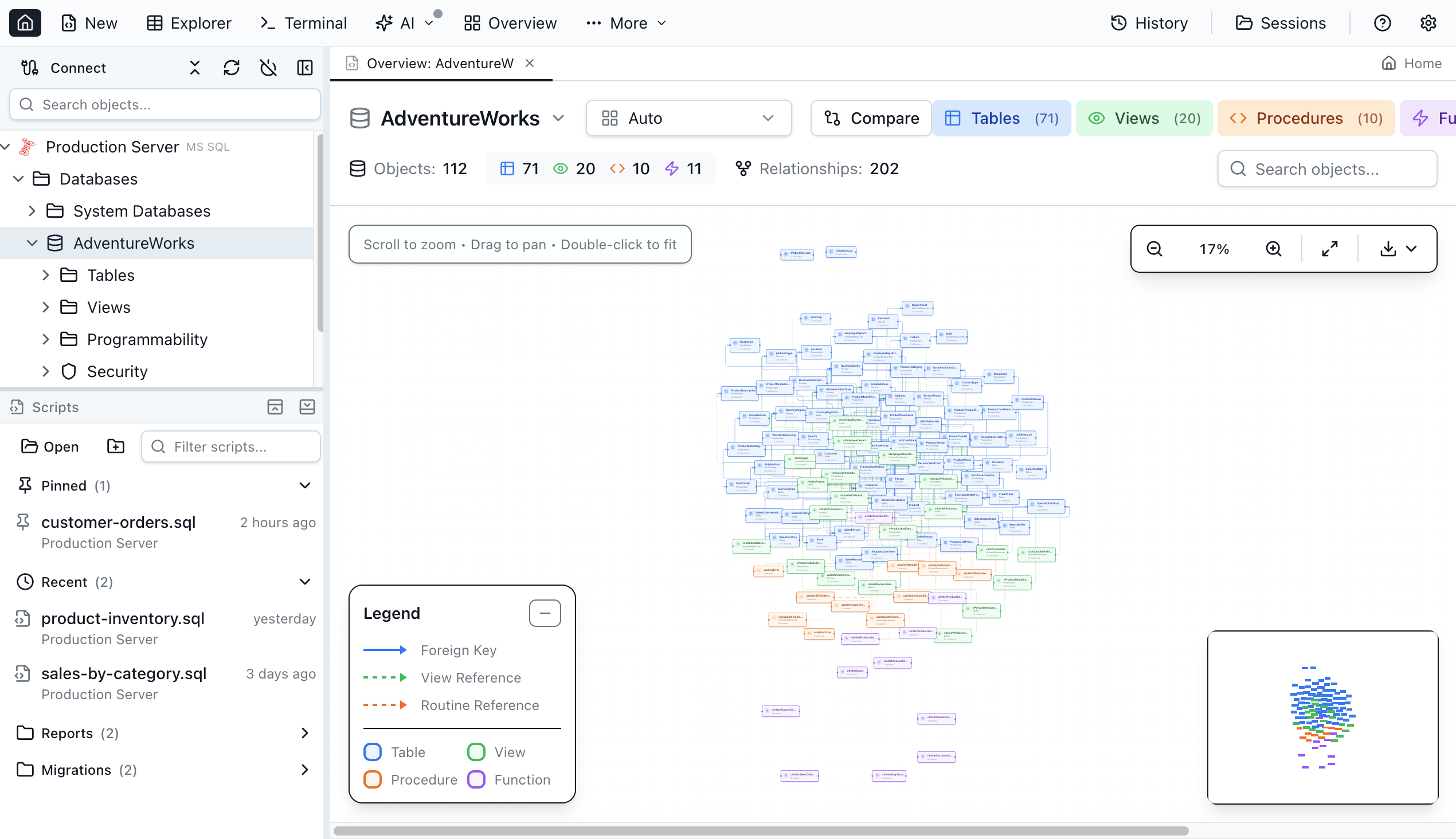
Understanding complex database relationships is easier with visual tools that map your entire schema.
Visual Schema Overview
- Interactive graph with tables, views, procedures, and functions as connected nodes
- Foreign key relationships shown as arrows
- Zoom and pan controls for large schemas
- Filter by object type (tables, views, procedures, functions)
Dependency Viewer
- Visualize object dependencies and references
- Preview schema change impact before execution
- Tree and graph view modes
- Cascading effect analysis
These visualization tools are particularly valuable when working with legacy databases or onboarding new team members.
Table Explorer and Data Management
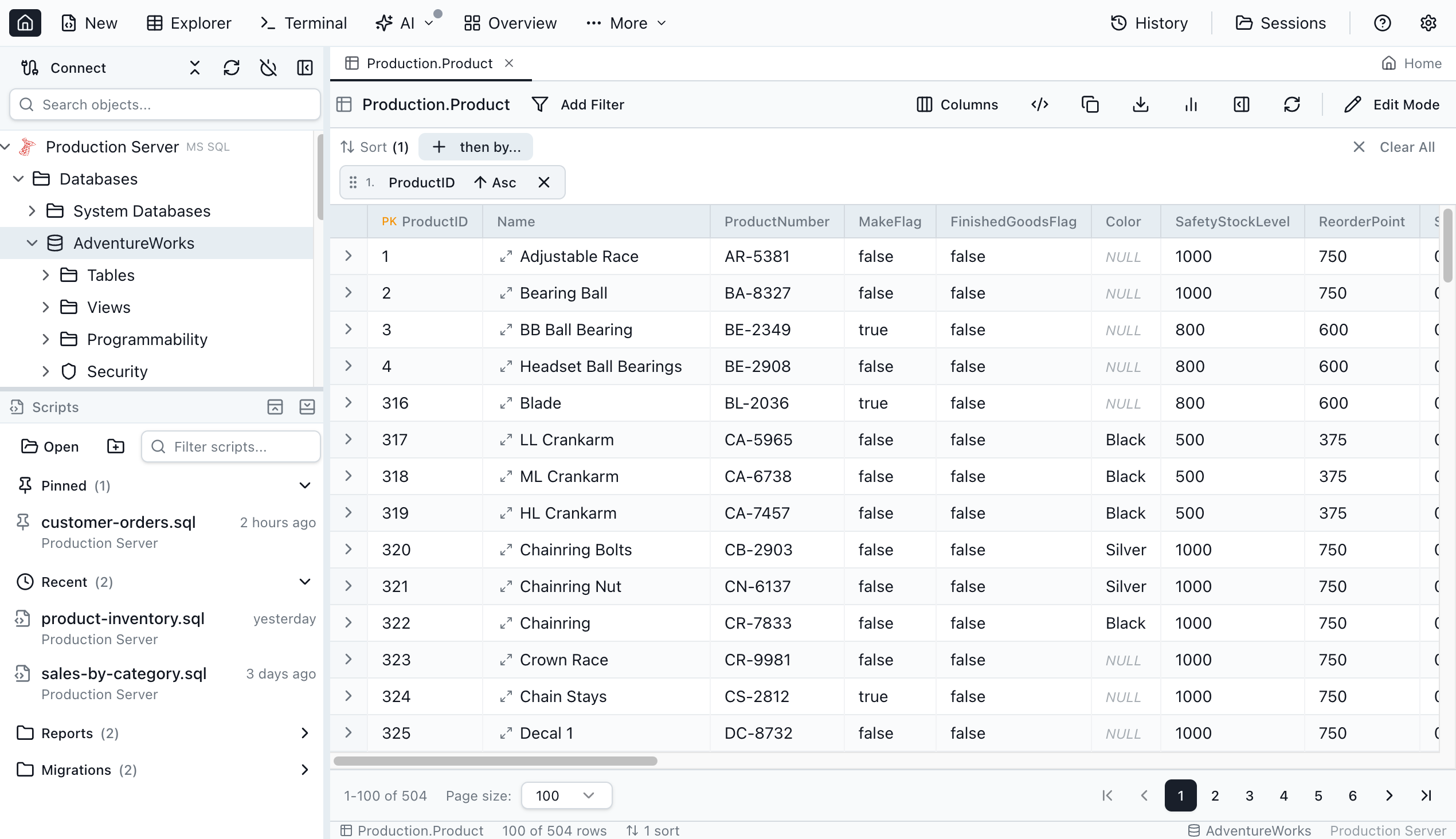
The table explorer provides a spreadsheet-like interface designed specifically for database workflows.
Table Explorer Features
- Browse and filter table data
- Inline row editing with validation
- Foreign key navigation with row preview
- Multi-format export (CSV, JSON, XLSX)
- Row details panel with JSON preview
Data Management Tools
- Backup and restore (.bacpac, .bak, pg_dump/pg_restore)
- Clone databases and tables with one click
- Export query results and table data
These features provide everything needed for day-to-day data operations without requiring separate database administration tools.
Session Persistence and Workspace Management
Never lose your work—Jam SQL Studio automatically saves your session state.
- Automatic Workspace Saving: Your workspace is saved automatically as you work
- Resume Exactly Where You Left Off: Reopen the application with all tabs, connections, and query state preserved
- Query History Access: Reopen closed tabs with full context and recently executed queries
- Tab Isolation: Each query editor tab maintains its own transaction state and context
This session persistence means you can close Jam SQL Studio mid-task and return later without losing your place or any unsaved queries.
Command-Line Access with jam-sql CLI
Extend Jam SQL Studio's capabilities to any terminal with the Go-based CLI tool.
CLI Commands
jam-sql doctor: Check installation & MCP statusjam-sql connections: List saved connectionsjam-sql query -c <connection> "<query>": Execute SQL queries directly from terminaljam-sql tools/jam-sql resources: Explore MCP server capabilities
Use Cases
- Automated Scripts: Integrate SQL queries into shell scripts and CI/CD pipelines
- Quick Database Checks: Run ad-hoc queries without opening the full application
- Development Workflows: Use alongside Git hooks or deployment automation
- Remote Operations: Query databases via SSH sessions with minimal dependencies
The CLI wraps the MCP server for programmatic database access, making Jam SQL Studio suitable for both interactive GUI work and automated scripting scenarios.
PostGIS Support (Coming Soon)
For PostgreSQL users working with spatial data, Jam SQL Studio will soon offer PostGIS support:
- Geometry Visualization: View geometry columns on a map
- Spatial Data Types: Full support for PostGIS spatial types
- Query Result Map Rendering: Display spatial query results directly in the interface
- Spatial Queries: Write and test PostGIS queries with IntelliSense
This upcoming feature extends Jam SQL Studio's capabilities to GIS professionals and teams working with location-based data.
Database Support and Platform Compatibility
Jam SQL Studio supports the most widely used relational database platforms with full feature parity.
Supported Database Engines
- Microsoft SQL Server: Full support including Azure SQL Database and Azure SQL Managed Instance
- PostgreSQL: Including Azure Database for PostgreSQL and Amazon RDS PostgreSQL
- MySQL: MySQL 5.7+ and 8.x, including Amazon RDS MySQL and Azure Database for MySQL
- MariaDB: MariaDB 10.x and 11.x
- SQLite: Local file-based databases
Platform Availability
Jam SQL Studio provides native desktop applications for all major operating systems:
- macOS: Native macOS application with full feature parity
- Windows: Windows application with familiar keyboard shortcuts from SSMS
- Linux: Linux application for distributions requiring GUI SQL tooling
All platforms support SQL Server, PostgreSQL, MySQL, MariaDB, and SQLite with IntelliSense, query execution, table explorer, and data export capabilities.
Authentication Support
- SQL Authentication: Standard username and password authentication
- Windows Authentication: Integrated Windows authentication for SQL Server
- Microsoft Entra ID: Connect to Azure SQL with device code flow, MFA-friendly with persistent token caching
This cross-platform support is particularly valuable for teams with mixed operating system environments or developers working from MacBooks who need SQL Server access.
Who Should Use Jam SQL Studio?
Jam SQL Studio is designed for software developers, DBAs, and data engineers who work with SQL Server, PostgreSQL, or MySQL—especially those on macOS or Linux who lack good native tooling.
Key Audience Segments
🛠️ Backend Developers: Developers who need a daily SQL client for querying, debugging, and schema work. AI autocomplete accelerates query writing, while schema compare tools ensure production safety when deploying changes.
🗄️ Database Administrators: DBAs managing SQL Server from Mac or Linux who previously relied on Azure Data Studio or remote SSMS. Access execution plans, schema compare, and data compare without requiring Windows.
🤖 AI-First Teams: Teams adopting AI-assisted development who want their SQL client to integrate with AI coding agents via MCP. The built-in MCP server enables Claude, Copilot, and custom agents to interact with databases securely.
🔄 Azure Data Studio Users: Developers migrating from Azure Data Studio after its retirement in February 2026. Familiar SQL notebooks, similar keyboard shortcuts, and enhanced AI features make the transition seamless.
⚡ Performance-Conscious Developers: Anyone frustrated with DBeaver's Java overhead and slow startup times, or those avoiding DataGrip's subscription cost. Jam SQL Studio provides fast startup and transparent pricing.
Industry Use Cases
- Software Development: Backend teams querying databases during development and debugging
- SaaS Companies: Managing production databases across development, staging, and production environments
- Fintech: High-security database operations with AI-assisted query development and comprehensive audit logging
- Healthcare IT: HIPAA-compliant database management with secure local-only MCP server operations
- Consulting: Client database work requiring cross-platform compatibility and professional-grade tools
- E-commerce: Query optimization and schema management for high-traffic transactional databases
Target Profile
- Age Group: 25–45 professionals with database development or administration responsibilities
- Experience Level: Intermediate to advanced database users who understand SQL fundamentals
- Platform: Mac, Windows, and Linux users seeking consistent tooling across environments
- Workflow: Developers integrating AI into their SQL workflows, DBAs requiring cross-platform access, teams migrating from Azure Data Studio
Pricing Plans: Free Tier with Pro Features
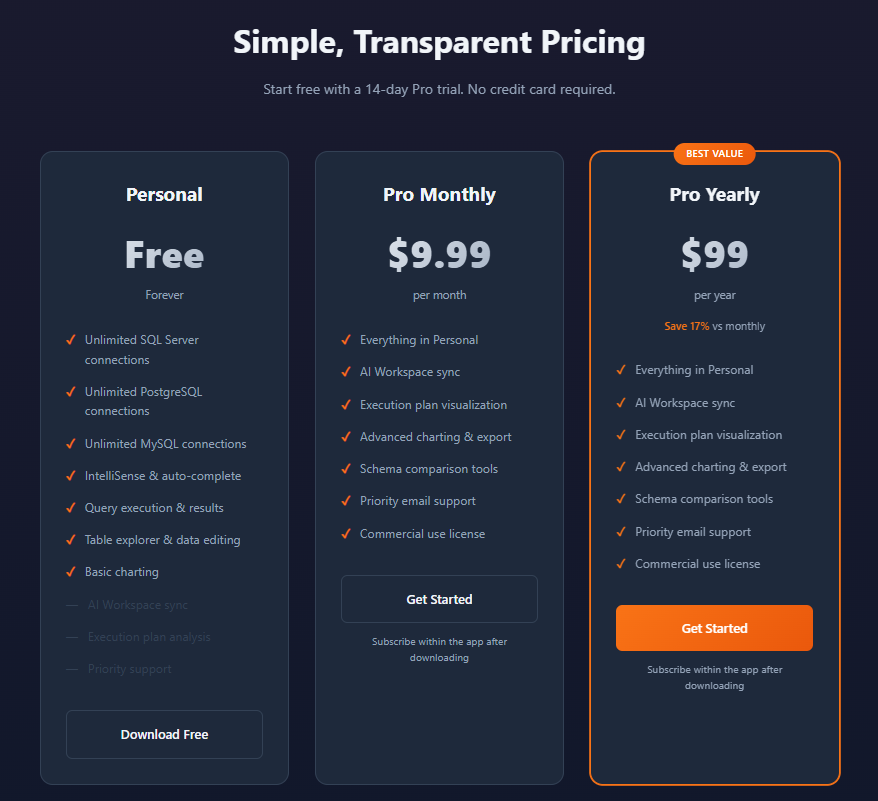
Jam SQL Studio offers transparent pricing with a generous free tier and affordable Pro subscription.
Personal Tier: Free Forever
Perfect for individual developers and personal projects:
- Price: Completely free, no credit card required
- Connections: Unlimited SQL Server, PostgreSQL, and MySQL connections
- Features Included:
- IntelliSense and auto-complete
- Query execution and results
- Table explorer and data editing
- Basic charting
- AI Workspace sync
- Execution plan analysis
- Priority support
- Account: No account required for basic usage
- License: Personal use only
Pro Monthly: $9.99/month
For developers and small teams requiring advanced features:
- Price: $9.99 per month
- Features: Everything in Personal Tier, plus:
- Advanced charting and export
- Schema and data comparison tools
- Priority email support
- Commercial use license
- Trial: 14-day free trial, no credit card required
Pro Yearly: $99/year (Best Value)
Save 17% compared to monthly billing:
- Price: $99 per year ($8.25/month equivalent)
- Features: Same as Pro Monthly
- Best For: Long-term users and teams committed to Jam SQL Studio
Enterprise: Custom Pricing
For organizations requiring volume licensing and dedicated support:
- Features: Volume licensing, priority support, SSO/SAML (coming soon), dedicated account management
- Contact: Contact sales for custom pricing and SLAs
All plans include a 14-day free trial of Pro features—download and start your trial immediately.
Migration from Azure Data Studio
With Microsoft retiring Azure Data Studio on February 28, 2026, Jam SQL Studio provides a straightforward migration path.
Migration Steps
- Download Jam SQL Studio: Install for your operating system (macOS, Windows, or Linux)
- Re-Create Database Connections: Add your SQL Server, PostgreSQL, MySQL, or Azure SQL connections using the same server addresses and credentials
- Transfer SQL Scripts: Copy your .sql query files from your Azure Data Studio workspace to any folder and open them directly in Jam SQL Studio
- Explore New Features: Discover capabilities beyond Azure Data Studio including AI workspace sync, built-in charting, and data compare
What You Can Bring to Jam SQL Studio
- SQL query files (.sql)
- Notebook files (.ipynb)
- Connection credentials
- Database projects
- Saved scripts
- Keyboard shortcuts (familiar SSMS and Azure Data Studio shortcuts)
Jam SQL Studio uses familiar keyboard shortcuts from SSMS and Azure Data Studio, reducing the learning curve for users migrating from Microsoft tools.
How Jam SQL Studio Stands Out From Competitors
Jam SQL Studio differentiates itself through AI-native architecture, cross-platform parity, and inclusion of enterprise features at accessible pricing.
Key Differentiators
- Built-in MCP Server: First SQL IDE with local MCP server for AI agent integration
- SQL Notebooks: Jupyter-compatible notebooks with SQL and JavaScript cells
- Schema and Data Compare: Professional comparison tools typically requiring expensive enterprise subscriptions
- Cross-Platform Parity: Full feature availability on macOS, Windows, and Linux
- AI Workspace Sync: Auto-generated context files for AI coding assistants
- Free Personal Tier: Unlimited connections with core features available forever
- Execution Plan Visualization: Query performance analysis available on Mac and Linux
- Multi-Database Support: SQL Server, PostgreSQL, MySQL, MariaDB, and SQLite in one tool
Competitive Analysis
| Feature | Jam SQL Studio | Azure Data Studio | SSMS | DBeaver | DataGrip |
|---|---|---|---|---|---|
| AI-Native (MCP + Workspace) | ✅ Yes | ❌ No | ❌ No | ❌ No | ⚠️ Limited |
| Claude Code CLI Integrated | ✅ Yes | ❌ No | ❌ No | ❌ No | ❌ No |
| SQL Notebooks (.ipynb) | ✅ Yes | ✅ Yes (Extension) | ❌ No | ❌ No | ❌ No |
| Cross-Platform (Mac/Win/Linux) | ✅ Yes | ✅ Yes | ❌ No | ✅ Yes | ✅ Yes |
| Execution Plan Visualization | ✅ Yes | ✅ Yes | ✅ Yes | ✅ Yes | ✅ Yes |
| Schema Compare | ✅ Yes | ✅ Yes | ❌ No | ✅ Yes | ✅ Yes |
| Data Compare | ✅ Yes | ❌ No | ⚠️ Via Tools | ✅ Yes | ✅ Yes |
| Built-in Charting | ✅ Yes | ✅ Yes | ❌ No | ⚠️ Pro Only | ❌ No |
| Command-Line CLI | ✅ Yes | ❌ No | ⚠️ Limited | ❌ No | ❌ No |
| Natural Language to SQL | ✅ Yes | ❌ No | ❌ No | ❌ No | ⚠️ Limited |
| Free Tier Available | ✅ Yes | ✅ Yes | ✅ Yes | ✅ Yes | ❌ No |
| SQL Server Support | ✅ Yes | ✅ Yes | ✅ Yes | ✅ Yes | ✅ Yes |
| PostgreSQL Support | ✅ Yes | ⚠️ Extension | ❌ No | ✅ Yes | ✅ Yes |
| MySQL / MariaDB Support | ✅ Yes | ❌ No | ❌ No | ✅ Yes | ✅ Yes |
| Modern UI | ✅ Yes | ✅ Yes | ⚠️ Classic | ✅ Yes | ✅ Yes |
What Makes Jam SQL Studio Unique
AI-Native from the Start: Built around AI integration with MCP server, AI Workspace, and context generation designed to work seamlessly with Claude, Copilot, and other AI coding assistants—unlike competitors that add AI features as afterthoughts.
Cross-Platform Enterprise Features: Schema compare, data compare, and execution plan visualization on macOS and Linux—capabilities that previously required Windows-only SSMS or expensive third-party tools.
Transparent Free Tier: Unlimited connections with core features forever, making it accessible for students, open-source contributors, and hobbyists.
Final Review Verdict: Is Jam SQL Studio Worth It?
After thoroughly exploring Jam SQL Studio, it clearly fills a critical gap in the SQL development ecosystem. As Azure Data Studio retires in February 2026, developers on macOS and Linux finally have a modern SQL client that doesn't require compromises.
What impressed me most was the AI-native architecture. The built-in MCP server and AI Workspace integration demonstrate a forward-thinking approach to database development that anticipates how developers actually work in 2026. Rather than tacking AI features onto a traditional SQL client, Jam SQL Studio is built around AI-assisted workflows from the ground up.
The free Personal tier is genuinely useful—unlimited SQL Server, PostgreSQL, and MySQL connections with IntelliSense, query execution, and table editing. This makes Jam SQL Studio accessible to individual developers, students, and open-source contributors without financial barriers.
For professionals requiring advanced features, the Pro subscription at $9.99/month or $99/year represents excellent value compared to alternatives. Schema compare, data compare, and execution plan visualization—tools that typically cost hundreds of dollars annually—are included at a fraction of the price.
The cross-platform parity is particularly noteworthy. Unlike many SQL tools that treat Mac and Linux as afterthoughts, Jam SQL Studio provides full feature availability across all operating systems. This is a game-changer for developers who prefer macOS or work in Linux environments but need SQL Server access.
This SQL client is particularly valuable for developers migrating from Azure Data Studio, teams adopting AI-assisted development, and any professional who needs enterprise-grade SQL tools on Mac or Linux.
Review Summary
- Ease of Use: ⭐⭐⭐⭐⭐ (5/5)
- Feature Completeness: ⭐⭐⭐⭐⭐ (5/5)
- AI Integration: ⭐⭐⭐⭐⭐ (5/5)
- Cross-Platform Support: ⭐⭐⭐⭐⭐ (5/5)
- Performance: ⭐⭐⭐⭐⭐ (5/5)
- Value for Money: ⭐⭐⭐⭐⭐ (5/5)
- Documentation: ⭐⭐⭐⭐⭐ (5/5)
- Overall Review Score: ⭐⭐⭐⭐⭐ (5/5)
Ready to experience the future of SQL development? 👉 Download Jam SQL Studio today. Start your 14-day free trial of Pro features and discover why this AI-native SQL IDE is the perfect Azure Data Studio alternative for Mac, Windows, and Linux.
Tags
# Review# SQL client for Mac# AI SQL editor# Azure Data Studio alternative# SQL Server Management Studio for Mac# SQL notebook Mac# AI-powered SQL client for macOS# best SQL Server client for Mac 2026# SSMS alternative for Mac and Linux# SQL editor with AI autocomplete Mac# SQL IDE# SQL Server# PostgreSQL# MySQL# MCP server# SQL development# database management# schema compare# execution plans# Claude# AI coding assistant# cross-platform SQL toolAONMeetings Review - Affordable Browser-Based Video Conferencing with Enterprise Security
TickTappy Review - Beautifully Simple One-Tap Time Tracking
Follow for new blogs
Subscribe to our blog
Subscribe to Newsletter
Subscribe to our newsletter to get the best products weekly.