Fismbot Review - AI Social Posts That Sound Like You
Welcome to our Fismbot review.
There is a specific kind of tired that comes from running social media for a small business. You already know what you want to say. You just do not have the hour it takes to say it, size it, caption it, tag it, schedule it and then remember to post it again on Thursday. So the account goes quiet for three weeks, and then you post four things in one day out of guilt.
Fismbot is built for that exact problem. It is an AI-powered social media automation platform from FISM Ltd, and its own pitch is refreshingly plain: help your business reach people, in a way that feels like you. That last part is the whole ballgame. There are dozens of tools that will happily generate generic captions. Far fewer try to learn how you actually sound first.
Note: If the name looks familiar but slightly off, you are not imagining it. The company has a blog post titled "Who is Feisbot, Fisbot, Fismot, Fisme AI...?" so they have clearly met every misspelling of their own brand already.
Fismbot currently runs two products. Post Pilot is the live one: it writes, illustrates, reviews and schedules social content. Email Pilot is the email side, and I will be upfront about its status in a moment because it matters to anyone reading this before they click. The platform is marked Beta on the Post Pilot page, and the demo posts are labelled as demonstrations rather than customer results, which is a level of honesty I appreciate in a category that usually shows you nothing but screenshots of imaginary success.
For this review I went through the homepage, the Post Pilot page, the Email Pilot page, the business information form, the pricing table, the FAQ and the articles on their blog. I have not run a long paid trial, so treat this as a careful read of a documented product plus a look at the free tier, not a laboratory test. Where something is confirmed by Fismbot's own pages I say so, and where the company lists a feature that is not yet written up in detail on the site, I say that too.
The Problem Fismbot Is Trying to Solve
Content marketing is the job no small team has spare hours for, and social is where that shortage shows up first. Posting usually breaks in the same five places:
- The blank page tax: The hardest part is not posting, it is starting. So the account stalls waiting for a burst of motivation.
- Voice drift: Generic AI output sounds like generic AI output. People can smell it, and it flattens the one advantage a small business has, which is having an actual personality.
- Context reloading: Every session you re-explain your business, your audience and your tone to a chatbot that forgot you the moment you closed the tab.
- Tool sprawl: One app writes, another designs, a third schedules, a fourth reports. Nothing talks to anything, and you are the integration layer.
- Flying blind: Even when you do post consistently, most owners have no clear picture of which posts brought people in and which ones disappeared.
Fismbot's answer is to put the brand context in once, at the start, and then reuse it across writing, images, video, scheduling and reporting. You fill in a business information form, and everything downstream is generated against that.
Fismbot in Action: The Same Four Steps Every Time
The company describes its workflow with the line "the same four steps, every time," and the product genuinely follows it:
- You share the input: business details, documents, brand assets, or just a short brief for the post you want
- Fismbot creates the work: the tools draft the copy and the visuals, or the human team does it if you have handed the job over
- You review the result: nothing is locked in. Every draft can be edited, reworded or regenerated before it goes anywhere
- You take the next step: approve it, schedule it, or ask the team to keep going
That third step is the one people underrate. Plenty of AI content tools treat generation as the finish line, which is why their output so often reads like it was published by a robot with a quota. Fismbot treats generation as the first draft, and the interface is built around reviewing and fixing rather than publishing on faith.
If you want to see the flow before reading the rest, the free tier at try.fism.bot gives you a handful of posts to play with, and I will come back to the limits of that free tier below.
Why Choose Fismbot?
Fismbot's own summary of the offer reads like a pitch, so I went through each claim and kept the version that the site actually backs up.
AI-Powered Automation. Post Pilot generates the social posts, the images and the rewrites, and on the paid plans it also carries the scheduling, publishing and analytics that follow. The workspace shows your remaining allowance as posts left and edits left, so you can see where you stand before you start rather than discovering a limit halfway through a campaign. That is AI automation doing the parts nobody enjoys, instead of just moving the same work to a different screen.
Month-to-Month, No Lock-In. There is no minimum term. You can cancel at any time without a penalty and without being asked why, and you keep access until the end of the period you already paid for. Upgrades and downgrades are self serve and take effect from the next billing cycle.
Transparent Pricing. The software tiers are published in full: Free, Starter at $20 a month, Pro at $49 a month, and Elite priced per requirement. There is nothing hidden alongside them, and done for you marketing, website and technical work is quoted in writing after a free consultation, with the full quote in front of you before any work starts.
Faster Content Creation. Fismbot frames the payoff as less repetitive work and faster content creation, working from a brief to something publishable in one sitting instead of a string of sessions. Nothing is locked in either, so the speed does not cost you the final review.
Human Support. Support runs through info@fism.bot with a stated reply time of within one business day, and the transparency page makes an explicit promise of no bots and no ticket queue. If you have ever waited three days for a canned answer from a platform you pay for, that detail is not small.
Software Pricing Instead of a Retainer. The published entry point is seven free posts with no credit card, then $20 a month for Starter and $49 for Pro. What Fismbot does not publish is a percentage saving against a traditional agency, and its own wording on the subject stays qualitative, describing its rates as lower than the market average. So the useful version of the cost argument is the price list you can read for yourself, plus the agency comparison further down this review.
And the rest of what stands out:
- 🎯 Brand alignment over generic output: Post Pilot learns from your website, your documents and your brand assets so drafts sound like your business
- 🖊️ Promptless by design: The guided experience does the prompt engineering for you, so you do not need to be good at talking to AI
- 🎨 Write it yourself if you want: You can generate text and images, or paste your own copy and upload your own photos and video
- 🗓️ Real scheduling, not just drafting: Queue posts, publish automatically, send at optimal times and manage everything from a calendar
- 📊 Reports that go past vanity: Post, Audience, Campaign and Best Times metrics in one dashboard
- 🎬 Video Studio built in: Generate short videos for social without leaving the tool, with the honest "experimental" label attached
- ✉️ An email product on the way: Email Pilot extends the same editor and voice work into email campaigns, currently by waitlist
Core Features Explained: The Heart of Our Review
Post Pilot: Content Without Prompt Engineering
Post Pilot is the core of Fismbot and it is built around a single idea: you should not have to become an AI whisperer to get usable content out of it. The company calls this "promptless bliss," which is a slightly cheeky way of saying the app asks you the questions instead of the other way around.
What that looks like in practice is a guided flow. You give a short brief for the post, or you let it pull from what it already knows about your business, and it drafts the copy and the accompanying image. If you would rather write it yourself, you can, and the tool will still handle the formatting, sizing and publishing around your text.
Posts can be tailored per channel rather than copy pasted everywhere. That matters more than it sounds. A caption that works on LinkedIn rarely works on Pinterest, and the tool lets you customise per destination before it queues the post.
Brand Analysis and Fingerprinting
This is the part that decides whether Fismbot is a toy or a tool.
Before it writes anything serious, Post Pilot asks you to work through a business information form. It takes about five minutes and includes:
- Your field of industry, which can generate an industry report for context
- Your website, which it scrapes for positioning and language
- Document uploads in PDF, TXT, DOCX, CSV and XLSX formats, up to seven files at 20MB each
- Your product or service description, target audience and goals
- Your social profiles, so it can read the tone you already publish in
- Digital assets, including PNG, JPG, WEBP, MP4 and MOV files
- Your brand colours, a primary and a secondary
Fismbot calls the mechanism behind this fingerprinting, and describes it as using your business information, documents and brand assets to shape content so it matches your voice and brand. Deep Content Analysis and personalised fingerprinting are both listed as paid features, which is a fair split: you can try the writing, but the deeper brand learning is what you are actually buying.
The goals you select here are not decoration. You pick from options like driving website traffic, generating leads, building brand awareness, promoting a sale, sharing educational content, growing your following and establishing thought leadership, and that shapes what the tool produces.
There is also a small but useful touch in the form: an option to generate images straight away after your post stack is built, and a toggle for using best image ratios for each social platform, so Instagram gets a 4:5 and TikTok gets 9:16 instead of everything being forced into a square.
Website and Document Analysis
Most small businesses have already written thousands of words about themselves. They are just scattered across a homepage, a services PDF, a pitch deck and a decade of old posts.
Fismbot's approach here is to read that material once and stop asking. In their own example, the scraper pulls twelve pages from a site. Add the document uploads and the brand assets and you have a reasonable picture of the business without the owner writing a second novel about what they do.
For a marketing agency or a freelancer setting up a client, this is the quiet time saver. Instead of briefing an AI with a page of context every session, you do it once per brand.
Images: Art Styles, Camera Poses and Characters
The image side is more capable than the caption generator crowd usually offers, and it is where Fismbot's own feature list gets ambitious.
Fismbot lists brand analysis, character generation, art styles and camera poses among its image and persona tools. The goal, as described, is personalisation: keeping a consistent look and a consistent character across posts instead of generating an unrelated image every time. The site's own demo set includes a "Character art post" sitting alongside a sci-fi story post, a brand story post and a data and insight post, which shows the intent clearly even though the written documentation for these specific options is thin so far.
The company has also said the website is being updated with the latest features, so I would expect more detail on this to appear. In the meantime, the parts that are documented in the app are solid: once an image is generated you can keep the current image, generate an AI image, upload your own, or edit the image with a prompt, which is the pragmatic combination most people actually need.
Video Studio
Video Studio is Fismbot's built in video generator, and it is genuinely the feature that made me sit up.
You choose your model, the length, the orientation (horizontal or vertical) and the quality, then describe each scene and attach reference images if you have them. Fismbot's demo includes a vertical video made for a social post, silent by design and clearly labelled experimental.
That "experimental" tag is worth trusting. Video generation is still a moving target, and a tool that tells you which parts are still settling down is easier to work with than one that promises cinema and delivers mush. For short vertical social clips it looks more than usable, particularly because whatever you generate drops straight into the post you are already building rather than living in a separate account.
Strategy Before Writing
One line on the Post Pilot page caught my eye: set the plan before you write.
That is the strategy planner, and it is the difference between a content generator and a content operation. Instead of starting from a single blank post and hoping a month emerges, you decide what the message is, who it is for and what order it lands in, and the posts follow from that plan. Email Pilot borrows the same idea, planning the shape of a campaign before the first email is written.
If you have ever posted twelve disconnected things in a month and wondered why nothing compounded, this is the fix for exactly that.
Review, Edit and Past Edits
Two features here deserve their own heading because they are the ones you feel daily.
The first is the new UI with Past Edits. You work in the current editor, and when you want to go back to an earlier version of your work, you can step back to it from inside the editor rather than rebuilding from scratch.
The second is the editing layer itself. Every generated post can be rewritten before it goes out, and the AI editing options are oddly well thought through. You can set a tone, choosing from Professional, Friendly, Adventurous, Exciting, Informative, Inspirational, Humorous, Empathetic, Authoritative, Conversational or Persuasive. You can also set a goal for the rewrite, such as boosting engagement, building brand loyalty, driving sales, increasing awareness, generating leads, educating your audience, promoting a product, sharing company news, building community or showcasing a testimonial.
That is a lot of knobs, and they are the right knobs. "Make it funnier" and "make it drive sales" are two completely different requests, and most tools only give you one dial.
Scheduling, Calendar and Publishing
This is where Post Pilot stops being a generator and starts being a social media scheduler.
Scheduling and automatic publishing are paid features, and the free tier is for creating and downloading content only. On the paid plans you get:
- Unlimited scheduling on Starter and above
- A send at optimal times option, for people who do not want to guess at posting hours
- Per post time control, with the hour and 15 minute increments if you would rather choose yourself
- A start date for post generation, so you can build ahead for a specific window
- A calendar view that collects all of your content in one place
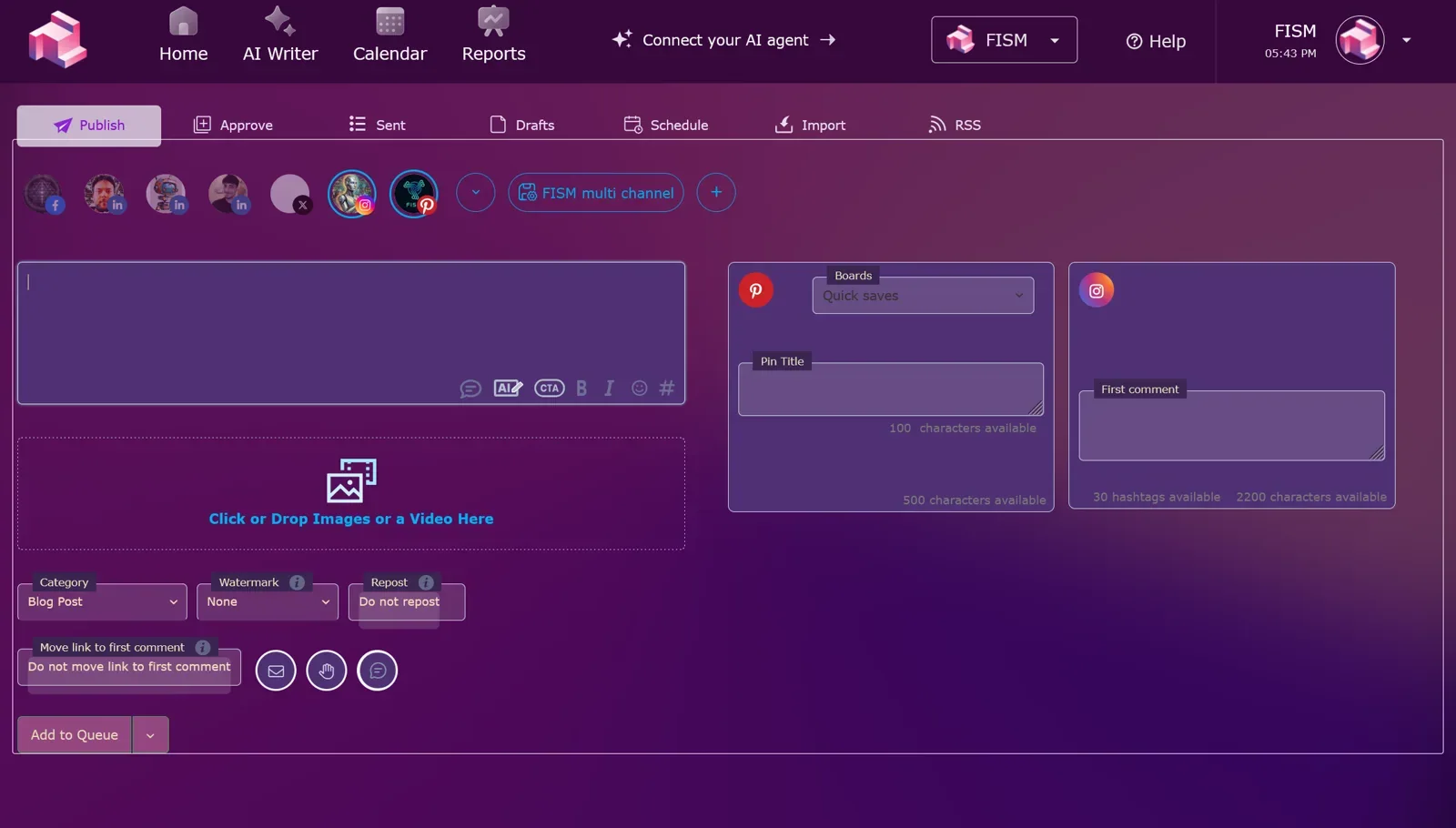
- Workflow tabs for Publish, Approve, Sent, Drafts, Schedule, Import and RSS
There are a few smaller publishing details that show someone on the team actually uses social media. You can add an automatic first comment, useful for the link in bio workaround on Instagram. You can post as a story with the 9:16 vertical format for Instagram and Facebook. And you can pin to a Pinterest board, with a default pin title.
Channels supported include X, LinkedIn, Instagram, Facebook, Threads, Bluesky, YouTube, Pinterest, TikTok and Google Business, along with a multi platform mode. Starter covers up to five social accounts, and Pro covers up to ten.
Reports
The reporting dashboard covers four areas: Post metrics, Audience metrics, Campaign metrics and Best Times metrics.
That Best Times section is the one to check first if you are sceptical about AI content tools generally. Anyone can generate forty captions. Knowing which hour on which day actually moved people is the feedback loop that stops you from generating forty more of the same thing.
Reports are a paid feature, starting on Starter.
Email Pilot
Here is the honest part, and it is the reason this review does not end with a link to a second product.
Email Pilot is not available yet. It carries a Coming Soon label, it is not open for self serve signup, and the only door currently open is the waiting list. On price, Fismbot is consistent in an interesting way: the Post Pilot pricing table lists Email Pilot as part of the Pro plan, while the Email Pilot page shows a standalone plan at $51 per month for full access. Both figures are on the official site, and which one applies to you will depend on whether you subscribe to Pro or buy the email product on its own when it launches.
What it promises sounds consistent with Post Pilot: unlimited AI email generation, bring your own SMTP configuration, AI personalisation using variables like name and company, template uploads, CSV dataset imports, campaign analytics and tracking, editable blocks with previews, a template builder and newsletter management. Fismbot describes generating a month of email campaigns in under an hour, and the guidance and the generated email sit side by side so you can review the two together.
If email is your main channel, the practical move is to join the waiting list and check back. If social is your main channel, Post Pilot is the product you can use today.
Pricing Plans: Free, Starter, Pro and Elite
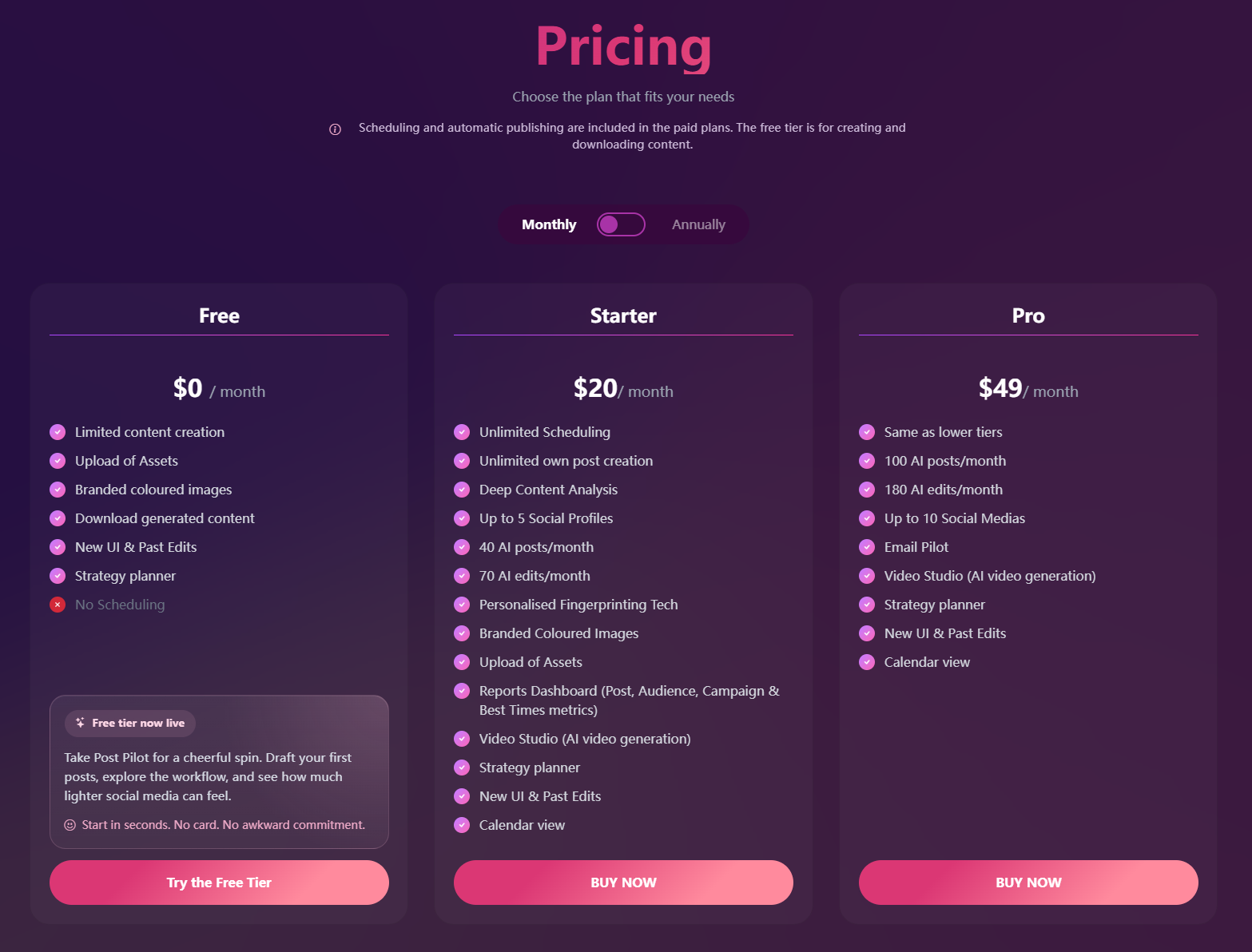
Fismbot keeps the structure simple. There is one free tier and three paid tiers, and the dividing line is mostly volume plus scheduling. The transparency page is worth reading before you subscribe, because it answers the questions people usually have to email a sales team to get.
Free Tier: 7 Posts, No Credit Card
- Price: $0
- What you get: 7 free posts, limited content creation, asset uploads, brand colour images, downloadable generated content, the new UI with Past Edits and the strategy planner
- What you do not get: Scheduling and automatic publishing
- Card required: No, and there is no commitment, cancel whenever
Verdict: This is a genuinely useful trial because it is not a seven day countdown that expires while you are on holiday. It is seven posts, so you can write them, judge whether the output sounds like you, and download the results even if you never pay. The free tier also shows up on try.fism.bot with the note that it is free for early birds, so if you are reading this early, the terms are on your side.
Starter: $20 per Month
- Price: $20 per month
- Scheduling: Unlimited
- Your own posts: Unlimited
- AI posts: 40 per month
- AI edits: 70 per month
- Social accounts: Up to 5
- Included: Deep Content Analysis, personalised fingerprinting technology, brand colour images, asset uploads, reports dashboard, Video Studio, strategy planner, calendar view, new UI with Past Edits
Verdict: For a single business this is the sensible plan. Forty AI posts a month is more than one a day, and the 70 AI edits give you room to actually polish rather than accept the first draft. Unlimited scheduling plus five accounts is enough for most small businesses and solo founders, and Video Studio at this price is the standout inclusion.
Pro: $49 per Month
- Price: $49 per month
- Everything in Starter, plus: 100 AI posts per month, 180 AI edits per month, up to 10 social accounts, and Email Pilot access when it launches
- Video Studio, strategy planner, calendar and reports: Included
Verdict: Pro is built for people running multiple brands or managing clients, where ten accounts and 100 posts a month stop being luxuries. Email Pilot is listed here as part of the plan, which is worth knowing for later, but do not upgrade for it today: the product is not live yet, and the Email Pilot page separately shows a $51 per month standalone plan for when it is. The volume and the account count are the honest reasons to pick Pro right now.
Elite: Custom Pricing for Higher Volume
- Price: Custom, quoted per requirement and subject to availability
- Built for: Volumes beyond what Pro covers, including multi brand operations and heavier email output
Verdict: Elite is the "talk to us" tier, and there is no published figure, which is normal at this level. It is still worth knowing it exists so you do not assume Pro is the ceiling and sign up for the wrong plan.
The Terms Worth Knowing
A few details from the transparency page that matter more than the headline prices:
- Billing: Monthly or annual, and Fismbot states that annual billing comes with a significant discount, so a yearly commitment is where the saving sits
- Cancel anytime: No minimum term and no cancellation fee, and access continues until the end of the period you already paid for
- Upgrades and downgrades: Handled from your account and effective from the next billing cycle, so starting on Starter and moving up later costs you nothing but a click
- Payment: Visa, Mastercard and American Express, processed through Stripe
- Support: Email support at info@fism.bot with a stated reply time of one business day, plus the deliberate promise of no bots and no ticket queue
- Services: Marketing, website and technical work is quoted after a free consultation, you see the full quote before any work starts, and the quote carries no obligation
- Data and reporting: Fismbot states your data stays yours and is never sold to third parties, and that campaign reports show the real numbers rather than only the flattering ones
The reporting promise there is worth holding a tool to. Plenty of platforms quietly show the two metrics that look good and skip the ones that do not.
How Fismbot Stands Out
The honest framing is that Fismbot sits between two crowds. On one side are the pure AI writers that generate text and leave the publishing, the visuals and the reporting to you. On the other are social schedulers that publish beautifully and cannot write a sentence.
Key Differentiators
- The brand layer comes first: Fingerprinting from your site, documents and assets means the output has a better shot at sounding like you
- Promptless workflow: The guided form replaces the prompt engineering that stops most small businesses from getting value out of AI
- Text, image and video in one place: Post Pilot covers copy, visuals, video and editing without another subscription
- Scheduling that is properly built: Optimal times, per post control, approval tabs, first comments, stories and Pinterest pinning
- Reporting with a feedback loop: Post, Audience, Campaign and Best Times metrics, not just a post count
- A human option behind the software: If you would rather not run campaigns yourself, Fismbot sells marketing services and website and tech help using the same tools
That last point is unusual and worth spelling out. Fismbot runs two modes: use the tools yourself, or hand the work to the team. You can switch between them. Services cover marketing campaigns, content, websites and technical support, and the company's promise is that you get a clear plan before any work starts and no jargon. For an SME whose actual blocker is "I do not know who to hire for this," that is a more useful answer than another dashboard.
Fismbot vs Hiring an Agency
The comparison Fismbot invites is with the traditional route: brief an agency, pay a retainer, wait. The differences that are actually documented are about terms rather than one headline number:
- Commitment: The software plans are month to month with no minimum term, where agency work is usually a retainer you sign up front
- Who does the volume work: With Post Pilot the AI produces the drafts and you approve them, so routine posting stops being billable hours
- Where the price is published: The software tiers are public ($0, $20, $49 and a custom Elite tier). Done for you services are quoted after a free consultation rather than listed
- Support: One business day email replies from a person, with no bots and no ticket queue
- The middle option: You can start on the software and hand campaigns to the team later, or the other way around, without switching platforms
What the site does not give you is a fixed side by side figure, which is why the comparison above is about terms rather than a headline saving. If cost is the deciding factor, price what you currently spend, ask Fismbot for a quote, and compare the two.
How It Compares in Practice
| What you need | Fismbot | Stitching separate tools together |
|---|---|---|
| Learn your brand voice | ✅ Fingerprinting from site, docs, assets | ❌ You paste context every session |
| Prompt engineering skill | ✅ Not required | ⚠️ Usually required |
| Writing and images together | ✅ In the same flow | ❌ Separate apps, manual matching |
| Video for social | ✅ Video Studio built in | ❌ Another subscription |
| Scheduling and calendar | ✅ Paid plans | ✅ Usually yes |
| Performance reporting | ✅ Post, Audience, Campaign, Best Times | ⚠️ Depends on each tool |
| Human help when stuck | ✅ Marketing, web and tech services | ❌ You find a freelancer |
The trade off is that you are putting a lot in one basket. If you already have a scheduler you love and a design workflow that works, Fismbot's advantage narrows to the writing and the brand learning. If your current system is four tabs and a notes app, the consolidation is the product.
Perfect For: Who Uses Fismbot?
🛍️ Small businesses and SMEs: Owners who are the marketing department and need posts to happen without eating the evening.
🎥 Influencers and creators: People who need a steady stream of on-brand content plus short video, without a designer on retainer.
⏱️ Time savers: Anyone whose real problem is not ideas but the hour per post it takes to get one live.
🏢 Agencies and freelancers: With multiple brands, Pro's ten accounts and the fingerprinting setup per client make sense.
✉️ Email marketers, later: If Email Pilot is the draw, join the waiting list now and watch for the self serve launch.
Final Review Verdict: Is Fismbot Worth It?
Fismbot is aiming at a real gap, and it aims at it in an unusually practical way. The pitch is not "AI will run your marketing." It is "less repetitive work, faster content creation, and you review and edit before anything goes out." For most small businesses that is the right promise, because the part they actually dread is the blank page and the part they actually need is the last look before publishing.
The fingerprinting idea is the strongest thing here. Content tools live or die on whether the output sounds like the business, and Fismbot's whole intake process is built around that rather than treating brand voice as an afterthought. The scheduling, calendar and reports turn it from a generator into something you could genuinely run a channel from, and Video Studio is a nice surprise at the Starter price.
Two things I would set expectations on. First, Email Pilot is not ready. It is priced and waitlisted, and if email is central to your plan, that is a future feature rather than a current one. Second, image generation controls like art styles, camera poses and character consistency are on the company's feature list, and the character art demo is there to look at, but the written documentation is still catching up. Try those on the free tier before you buy on the strength of them.
The pricing is easy to defend. Seven free posts with no card covers a real test of writing quality. Starter at $20 per month covers a normal single business comfortably. Pro at $49 per month with 100 posts and ten accounts is aimed at people who need volume or manage several brands, with Email Pilot listed for whenever it opens, and Elite exists for anyone who outgrows that. Because everything is month to month with no minimum term and annual billing carries a stated discount, you can start small and move up only when the volume actually demands it.
If your social media goes quiet because of time rather than ideas, Fismbot is worth a proper look. Start with the free posts, read every draft critically, and judge it the way you would judge a new freelancer: on whether the voice sounds like yours.
Review Summary
- Ease of Use: ⭐⭐⭐⭐⭐ (5/5)
- Brand Alignment: ⭐⭐⭐⭐⭐ (5/5)
- Content Generation Volume: ⭐⭐⭐⭐ (4/5)
- Scheduling and Calendar: ⭐⭐⭐⭐⭐ (5/5)
- Reports: ⭐⭐⭐⭐ (4/5)
- Video Studio: ⭐⭐⭐⭐ (4/5)
- Value for Money: ⭐⭐⭐⭐⭐ (5/5)
- Overall Review Score: ⭐⭐⭐⭐☆ (4.5/5)
Ready to see if the drafts sound like you? 👉 Head to Fismbot's Post Pilot page to see the current plans, or jump straight into the free tier at try.fism.bot and create your 7 posts with no credit card, no commitment and nothing published until you say so.
Tags
# Review# Fismbot# Fismbot review# Post Pilot# AI social media automation# social media scheduler# content marketing# AI automation# email pilot# AI content generator# brand voice# social media calendar# AI video generation# small business marketing# social media reports# content scheduling tool# marketing automation# AI writing assistant# SME marketing tools# influencer content# social media management# time saving tools# FISM LtdFollow for new blogs
Subscribe to our blog
Subscribe to Newsletter
Subscribe to our newsletter to get the best products weekly.