AI Invitation Maker by Greetings Island Review - Create Stunning Event Invites in Seconds
Welcome to our AI invitation maker by Greetings Island review! Let's explore how this AI-powered tool transforms the way you create stunning event invitations.
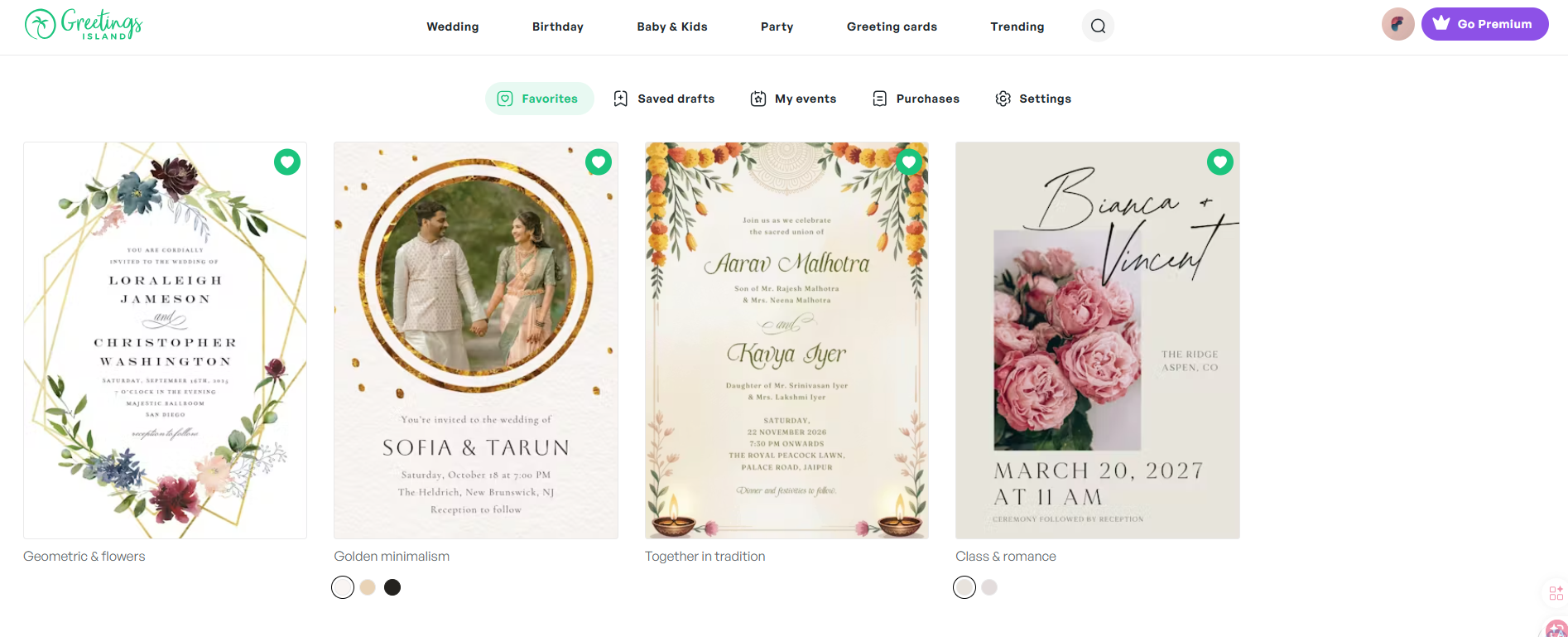
Planning the perfect celebration starts with setting the right tone. Whether it's a wedding, birthday party, baby shower, or any special occasion, your invitation creates the first impression your guests will have. But designing beautiful invitations has traditionally required hours of creative work—or hiring expensive designers.
Greetings Island changes this paradigm with their AI invitation generator. This innovative tool uses generative AI to turn simple text descriptions into invitation designs in seconds. Unlike some AI tools that hand you a flat image you cannot touch, Greetings Island's editor lets you keep working on the generated design.
How Greetings Island describes itself: the service provides web and mobile tools for invitations and cards that can be downloaded, printed, or sent online. Invitations can include RSVP and event-management features.
The result? Professional-looking invitations created in minutes, not hours.
What sets this AI invitation maker apart is its focus on editing tools and versatility. You're not limited to what the AI generates. You can edit text, move supported elements, change fonts, add stickers, and incorporate your own photos. With built-in RSVP management, options to download for print, share online, or send digitally, it's a complete solution for modern event hosts.
In this review, we'll explore how Greetings Island's AI-powered invitation maker helps you create beautiful invitations for any celebration without design experience. Product capabilities, plan contents and prices change over time, so confirm the details on Greetings Island's own pages before you rely on them.
The Problem Greetings Island Solves
Traditional invitation design approaches have several frustrating limitations:
- Time-Consuming Design Process: Creating beautiful invitations from scratch requires graphic design skills and hours of creative work
- Limited Template Variety: Most invitation platforms offer static templates that all look similar and don't reflect your unique style
- Difficult Customization: Once you pick a design, changing fonts, colors, or layout elements often requires technical knowledge
- Separate RSVP Management: After creating invitations, you still need separate tools to manage guest responses
- Format Limitations: Many tools generate images you can't edit, forcing you to start over if something isn't perfect
- Cost Barriers: Professional invitation designers charge premium rates, leaving budget-conscious hosts with limited options
Greetings Island addresses these pain points with AI-powered design and comprehensive event management features—helping anyone create beautiful, personalized invitations regardless of design experience.
Why Choose AI Invitation Maker by Greetings Island?
- ✨ AI-Powered Design: Describe your event in plain language and watch AI generate a custom invitation in seconds
- 🎨 Editing Tools: Edit text, fonts, colors, add stickers, and incorporate photos with a drag-and-drop editor (which elements can be edited depends on the template)
- 📅 Built-in RSVP Management: Add online RSVP links, gift registry links, maps, and more with one click
- 🎉 Perfect for Any Celebration: Weddings, birthdays, baby showers, parties, holidays, business events, and more
- 🆓 Free and Paid Options: Some invitation creation is available at no cost, with paid plans that add more; check the official pricing page for what is currently included
- 📱 Mobile App Available: Download the free app from the App Store or Google Play to create and manage invitations on the go
- 🔗 Multiple Sharing Options: Download for print, share online, or send digitally to guests
- 🖼️ Your Photos Become the Design: Upload your own images and event details so the invitation is built around them
- 🌐 Vast Template Library: Access thousands of professionally designed templates across every occasion
- 💾 Save and Reuse: Save your drafts and favorites to revisit and reuse for future events
- 🌈 Style Flexibility: Choose from elegant, rustic, floral, modern, simple, vintage, beach, and many more design styles
Core Features Explained: The Heart of Our Review
AI Magic Invite Generator
The AI Magic Invite is the centerpiece of Greetings Island's invitation-making experience.
How AI Magic Invite Works
Creating an invitation takes just four simple steps:
- Describe Your Event: Type your event details and theme in plain language—what's happening, when, where, and the vibe you want
- AI Creates Your Design Instantly: Watch as generative AI transforms your description into a ready-to-edit design in seconds
- Refine the Design: With the editor, adjust fonts, colors and layout where the template allows it
- Download, Print, Share, and Manage RSVP: Complete your workflow—download for print, share online, or send digitally
The AI understands natural language, so you can simply describe what you need. "A floral baby shower invitation with pastel colors for March 15th at 2pm" or "Elegant wedding invitation with gold accents for Sarah and Michael's wedding on June 20th"—the AI interprets your vision and creates a starting point you can refine.
Tips for Getting the Perfect Invitation
Greetings Island provides helpful guidance to optimize your AI-generated results:
- Share Important Event Details: Tell the AI what the event is about and include essentials like date, time, location, and guest instructions
- List Elements You Want: Specify what should appear on the invitation—event title, host names, RSVP information, or special notes
- Describe Layout and Visuals: Mention specific design elements you envision, like flying unicorns, balloons, floral frames, or anything matching your theme
- Choose Your Style and Colors: Pick your preferred style and color palette directly in the Magic invite window to help AI match your vision from the start
Ideal for: Busy event hosts, party planners, brides-to-be, new parents, and anyone who wants beautiful invitations without spending hours designing.
Magic Photo Feature
Transform your personal photos into magical AI-powered invitations with Greetings Island's Magic Photo feature.
How Magic Photo Works
- Select a Magic Photo Design: Browse through AI-powered photo invitation templates
- Upload Your Own Photo: Add your favorite image—wedding photo, baby picture, birthday moment, or any meaningful photo
- AI Creates Your Invitation Instantly: The AI integrates your photo with professional design elements
- Tailor It Your Way: Edit text, add embellishments, and personalize the editable details
- Download, Print, Share, and Manage RSVP: Complete your invitation workflow from one platform
Magic photo invitations are perfect for adding a personal touch that showcases your style and creates emotional connections with guests before the event even begins.
Perfect Use Cases for Magic Photo
- Wedding Invitations: Feature engagement photos or couple portraits with elegant design elements
- Birthday Invitations: Highlight milestone moments or personality shots for adults and kids
- Baby Shower & Announcements: Share ultrasound images or newborn photos with adorable designs
- Anniversary Parties: Use wedding photos or anniversary portraits to celebrate lasting love
- Graduation Parties: Showcase graduation photos in celebratory designs
- Family Reunions: Include group photos to build excitement for gathering together
The Magic Photo feature bridges the gap between traditional photo invitations and modern AI design, giving you the best of both worlds.
Comprehensive Template Library
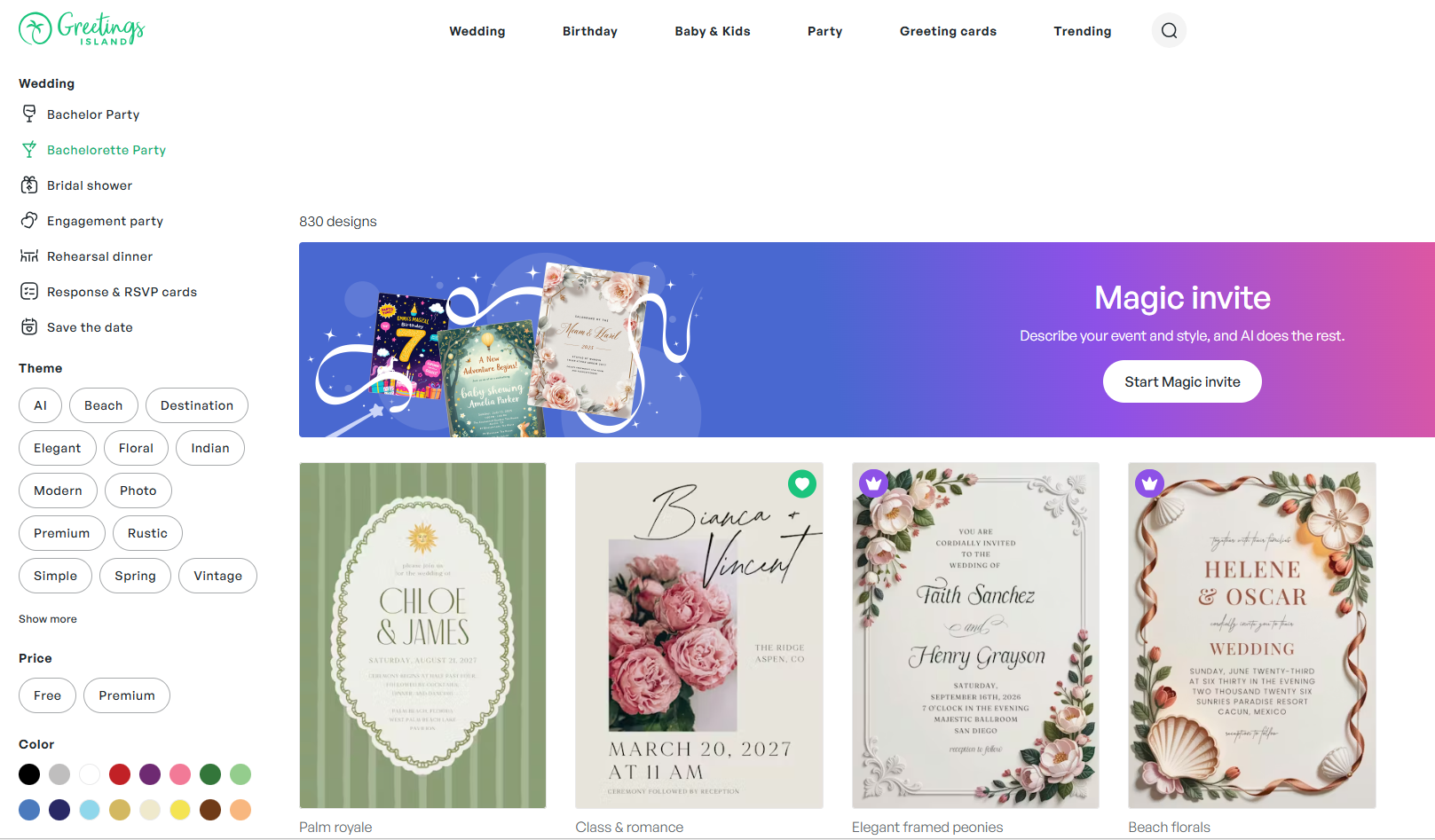
Greetings Island offers an extensive collection of professionally designed templates across every imaginable occasion.
Wedding Invitation Categories
- Styles: AI-generated, elegant, rustic, floral & botanical, modern, simple, Indian, vintage, beach, photo, destination, premium
- Wedding Stationery: Save the date cards, RSVP cards, bridesmaid cards, engagement announcements, wedding announcements
- Pre-Wedding Parties: Engagement party, bridal shower, bachelor party, bachelorette party, rehearsal dinner
- Wedding Greetings: Wedding wishes, thank you cards, engagement congratulations
Birthday Invitation Categories
- Birthday Invites: Kids, women's, add a photo, men's, babies, teens, save the date, surprise
- Kids Milestones: 1st birthday, 2nd birthday, 10th birthday, 13th birthday, sweet 16, quinceañera, bar & bat mitzvah
- Adult Milestones: 18th, 21st, 25th, 30th, 40th, 50th, 60th, 70th, 80th, 90th birthday
- Birthday Themes: AI, princess, animal, unicorn, butterfly, sleepover, dinosaur, rainbow, mermaid, gaming
Baby & Kids Categories
- Baby Events: Baby shower, gender reveal, baby sprinkle, sip & see
- Baby Shower Themes: Floral, woodland, butterfly, safari, princess, rustic, elephant, rainbow, dinosaur, fiesta
- Announcements: Birth announcements, pregnancy announcements
- Religious Events: Baptism & christening, bar & bat mitzvah, first communion
Party Categories
- Celebrations: AI-generated, graduation party, anniversary, retirement & farewell, engagement party, baby shower, rehearsal dinner, bridal shower, bachelor party, memorial, save the date
- Gatherings: Housewarming, dinner party, cocktail party, lunch & brunch, family reunion, back to school, sleepover, BBQ, potluck, summer & pool, luau, sports & games, picnic
- Holidays: Ramadan, St. Patrick's Day, Easter, 4th of July, Labor Day, Rosh Hashanah, Halloween, Diwali
- Business Events: Gala, grand opening, open house, cocktail party, dinner party, retirement, save the date
Greeting Cards
- Birthday: AI-generated, kids, funny, milestone, belated, add a photo, family, for her, for him
- Events & Occasions: New baby, graduation, wedding, anniversary, retirement, engagement, bar mitzvah, new home
- Thank You: General, graduation, teacher appreciation, for support, wedding, birthday, baby, baptism
- Thoughts & Feelings: Get well, sympathy, love & romance, congratulations, good luck, sorry, miss you, farewell & goodbye
This comprehensive template library means you'll never run out of design inspiration, whether you're planning a wedding, celebrating a birthday, or hosting any special occasion.
Powerful Editing Tools
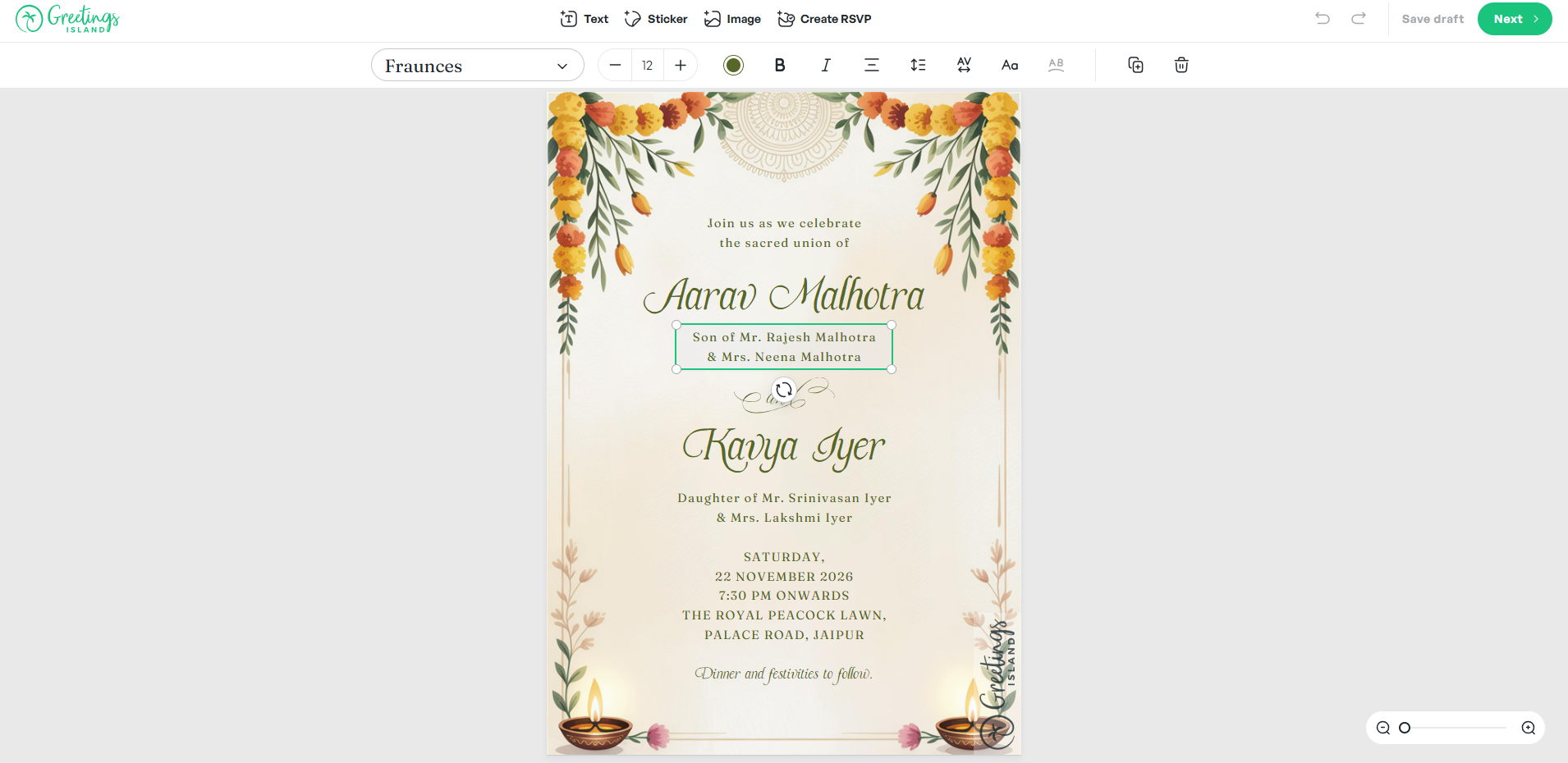
What truly distinguishes Greetings Island from other AI invitation generators is the editor you get after generation.
Editing Tools
Greetings Island's editor provides editing capabilities:
- Text Editing: Change fonts, sizes, colors, and text positioning
- Element Movement: Move, resize, and rearrange supported design elements (which layers you can move depends on the template and on how the design was generated, so some parts of a design are fixed)
- Font Customization: Choose from a range of fonts to match your event's mood
- Color Palette Modification: Adjust colors to match your theme perfectly
- Sticker Library: Add decorative stickers and embellishments
- Photo Integration: Upload and position your own photos
- Layout Adjustment: Change composition and spacing within the limits of each template
Why Editable Designs Matter
AI-generated designs are a starting point, but every event is unique. Greetings Island's editable templates mean:
- Personalization: Add names, dates, and details that make invitations meaningful
- Error Corrections: Fix typos or mistakes without starting over
- Theme Adjustments: Modify colors and styles to match decorations or party themes
- Last-Minute Changes: Update venue, time, or other details as plans evolve
- Creative Expression: Transform a template into something uniquely yours
This flexibility helps your invitation represent your vision and event, rather than settling for a generic design.
RSVP and Guest Management
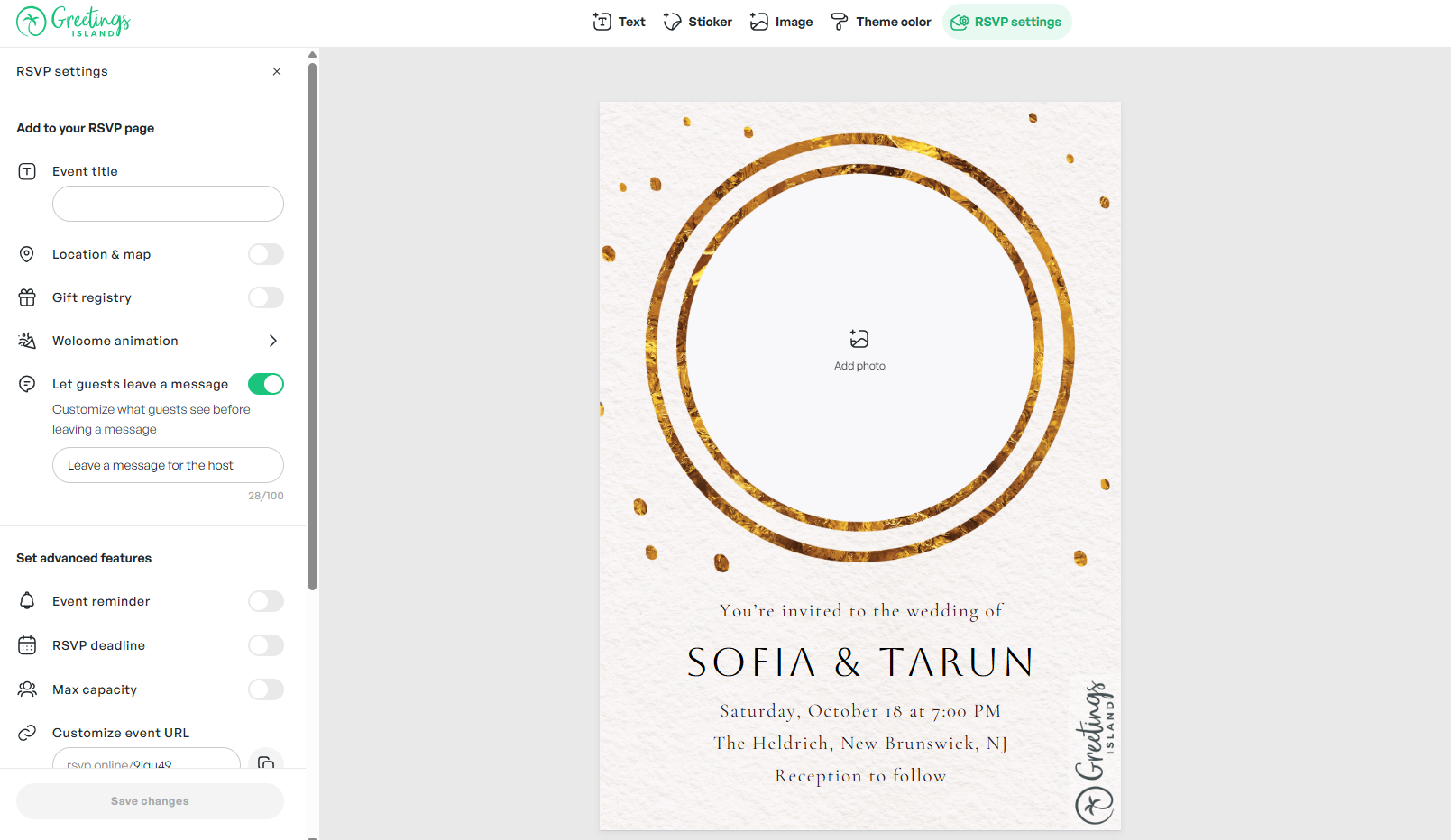
Managing guest responses is a critical part of event planning, and Greetings Island streamlines this with built-in RSVP functionality.
Easy RSVP Integration
With one click, add:
- Online RSVP Links: Let guests respond digitally for easy tracking
- Gift Registry Links: Share wedding or baby shower registries seamlessly
- Map Links: Provide location details and directions
- Additional Information: Include parking notes, dress codes, or special instructions
Benefits of Integrated RSVP
- Centralized Tracking: Keep track of guest responses in one place
- Reduced Phone Calls: Minimize guests needing to call or text with questions
- Accurate Headcounts: Plan catering, seating, and supplies with confidence
- Guest Convenience: Make it easy for guests to respond and get event details
- Digital Integration: Perfect for modern, tech-savvy event hosts
This integrated approach eliminates the need for separate RSVP platforms, simplifying your event planning workflow.
Pricing: Plans and Availability
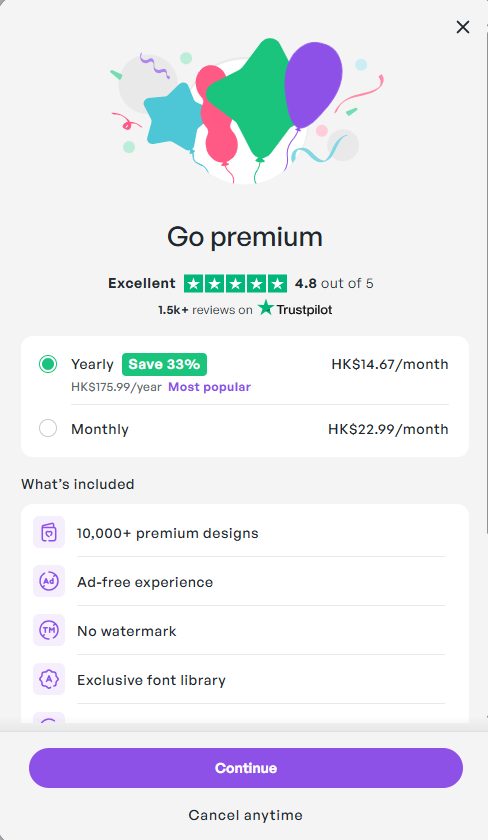
Greetings Island offers a mix of free and paid options, and the lineup has changed more than once.
What to Expect
- Free and paid options: Some invitation creation is available at no cost, alongside paid memberships that add more
- Details change over time: Which features sit on which plan, how many credits a plan includes, and the current prices are set by Greetings Island and can change at any time
- Check the official page: For the current breakdown, read the plan details on Greetings Island before committing
Because plan contents, credit limits and prices move around, we deliberately do not publish a feature-by-feature tier comparison here. What the service supports right now is described on its own pricing pages, and invitations can include RSVP and event-management features.
Where the Value Comes From
Rather than a specific feature list, it is more useful to think about what you are paying for:
- Time saved: Generation plus editing replaces starting from a blank canvas
- Consistency: Reuse a look across save-the-dates, invitations and thank-you cards
- Guest handling: RSVP and event-management features live next to the design
- Delivery choice: Download, print, or send online depending on the plan you are on
System Requirements and Compatibility
Greetings Island is a web-based service designed for maximum accessibility:
- Account: Create an account to save your designs; see the official site for what each plan currently includes
- Internet Connection: Required for AI generation and cloud-based editing
- Browser Access: Modern web browser—works on desktop, tablet, and mobile
- Mobile App: Free app available on the App Store and Google Play for on-the-go editing and sharing
- No Software Installation: Everything runs in the browser or app—no complicated setup required
- Access on Web and Mobile: Create and manage invitations on the website or in the free mobile app
As a cloud-based platform, there's nothing to install or update—just visit the website and start creating.
How to Create Your AI Invitation
Getting started with Greetings Island's AI invitation maker is simple and intuitive:
- Visit the AI Invitation Generator: Navigate to the AI invitation generator page
- Describe Your Event: Type your event details, theme, and any specific elements you want
- Choose Style and Colors: Select your preferred style and color palette
- Generate AI Design: Click to let AI create your custom invitation
- Customize Everything: Personalize fonts, text, colors, and add photos or stickers
- Add RSVP Details: Include online RSVP links, registry information, maps, and other guest details
- Share Your Invitation: Download for print, share online, or send digitally to guests
The entire process takes minutes, and the AI understands natural language descriptions—just tell it what you want in plain English.
How Greetings Island Stands Out From Competitors
Greetings Island differentiates itself with a unique combination of AI-powered generation and full design customization.
Key Differentiators
- Editable AI Designs: Generative AI creates starting designs you can refine in the editor
- Natural Language Understanding: Describe your event in plain language, no design terminology required
- Comprehensive Template Library: Thousands of professional templates across every occasion
- Built-in RSVP Management: Integrated links and guest management eliminate separate tools
- Multiple Sharing Options: Download, share online, or send digitally from one platform
- Photo-Driven Designs: Your photos and event details become the basis of the invitation
- Magic Photo Integration: Transform personal photos into AI-enhanced designs
- Free Option: Some invitation creation is available at no cost, with optional paid plans for more
- Mobile App Support: Free app on App Store and Google Play
Competitive Analysis
Different invitation design tools take varying approaches to helping users create beautiful invitations.
| Feature | Greetings Island AI | Canva | ChatGPT/Gemini |
|---|---|---|---|
| AI-Powered Design | ✅ Yes | ✅ Limited | ✅ Yes |
| Editable Designs | ✅ Yes (varies by template) | ✅ Yes | ❌ No (Static) |
| Natural Language Input | ✅ Yes | ❌ No | ✅ Yes |
| RSVP Management | ✅ Built-in | ❌ Separate | ❌ No |
| Photo Integration | ✅ Yes | ✅ Yes | ⚠️ Limited |
| Print Downloads | ✅ Yes | ✅ Yes | ❌ No |
| Template Library | ✅ Thousands | ✅ Millions | ❌ No |
| Free Option | ✅ Yes | ✅ Limited Credits | ⚠️ Depends |
| Mobile Friendly | ✅ Yes | ✅ Yes | ✅ Yes |
| Event-Specific Categories | ✅ Extensive | ✅ General | ❌ No |
This table is an orientation aid, not a specification. Plan contents, credit limits and feature availability change, so confirm current details on Greetings Island's own pricing pages.
What Makes Greetings Island Unique
AI Plus Customization: Combines AI generation with editing tools. Start with AI-generated designs, then customize details with editing tools.
Event-Specific Expertise: Specializes in invitations and event stationery with deeply categorized templates for weddings, birthdays, baby showers, parties, holidays, and business events.
Complete Invitation Workflow: Integrates the entire process from design creation to guest response tracking—a one-stop solution for event hosts.
Your Details Shape the Invitation: The photos and event details you supply are what the design is built around.
Perfect For: Who Uses AI Invitation Maker?
👰♀️ Brides-To-Be: Plan weddings with elegant, personalized invitations that match colors, fonts, and themes. Create save-the-dates, bridal shower invites, and rehearsal dinner cards—all coordinated beautifully for your special day.
👶 New Moms & Moms-to-Be: Announce baby showers, gender reveals, and births using Magic Photo to share precious moments with adorable designs that celebrate your little one.
🎂 Busy Moms: Organize kids' birthday parties, milestone celebrations, and family gatherings with quick AI generation. From princess themes to superhero invites, create something your little ones will love.
🎓 Young Women: Create trendy invitations for graduation parties, sweet 16s, milestone birthdays, and social events. AI generation makes beautiful designs accessible for celebrations on a budget.
👨👩👧👦 Multi-Generational Families: Plan reunions, holidays, and family milestones using personal photos and custom messages. Create designs that resonate with family members of all ages.
🎉 Social Hostesses: Organize casual gatherings, dinner parties, brunches, and get-togethers with stylish invitations that set the perfect tone. Impress guests without spending hours on design.
Final Review Verdict: Is AI Invitation Maker by Greetings Island Worth It?
After thoroughly exploring Greetings Island's AI invitation maker, it clearly transforms the invitation design experience. Unlike platforms that generate static images, this tool combines AI generation with customizable designs, RSVP management, and professional templates.
What impressed me most was the balance between AI convenience and creative control. AI Magic Invite generates beautiful starting designs in seconds, while the editor ensures your invitation matches your vision perfectly.
The free option lowers the barrier, making it easy for anyone to try. Paid plans provide flexibility for multiple events, and what each plan currently includes is listed on Greetings Island's pricing pages. Visit Greetings Island to experience the AI invitation generator.
This tool is particularly valuable for busy individuals planning weddings, milestone birthdays, baby showers, and any celebration where personalized invitations set the tone.
Review Summary
- Ease of Use: ⭐⭐⭐⭐⭐ (5/5)
- Design Quality: ⭐⭐⭐⭐⭐ (5/5)
- Customization Options: ⭐⭐⭐⭐⭐ (5/5)
- Template Variety: ⭐⭐⭐⭐⭐ (5/5)
- AI Generation Speed: ⭐⭐⭐⭐⭐ (5/5)
- RSVP Integration: ⭐⭐⭐⭐⭐ (5/5)
- Value for Money: ⭐⭐⭐⭐⭐ (5/5)
- Overall Review Score: ⭐⭐⭐⭐⭐ (5/5)
Ready to create beautiful invitations in seconds? 👉 Try AI invitation maker by Greetings Island today. Transform your event planning with AI-powered design that makes invitation creation fun, fast, and beautifully personalized.
Tags
# Review# AI invitation maker# invitation# design# rsvp# AI invitation generator# event invitations# wedding invitations# birthday invitations# party invitations# baby shower invitations# invitation templates# generative AI# custom invitations# digital invitations# invitation design# event planning# invitation maker# AI-powered design# RSVP management# print invitations# online invitations# femaleTickTappy Review - Beautifully Simple One-Tap Time Tracking
DepLog Review - Smart Dependency Monitoring with Risk Scoring
Follow for new blogs
Subscribe to our blog
Subscribe to Newsletter
Subscribe to our newsletter to get the best products weekly.