TickTappy Review - Beautifully Simple One-Tap Time Tracking
Welcome to our TickTappy review! Let's explore how this beautifully simple one-tap time tracking app transforms the way you track your time.
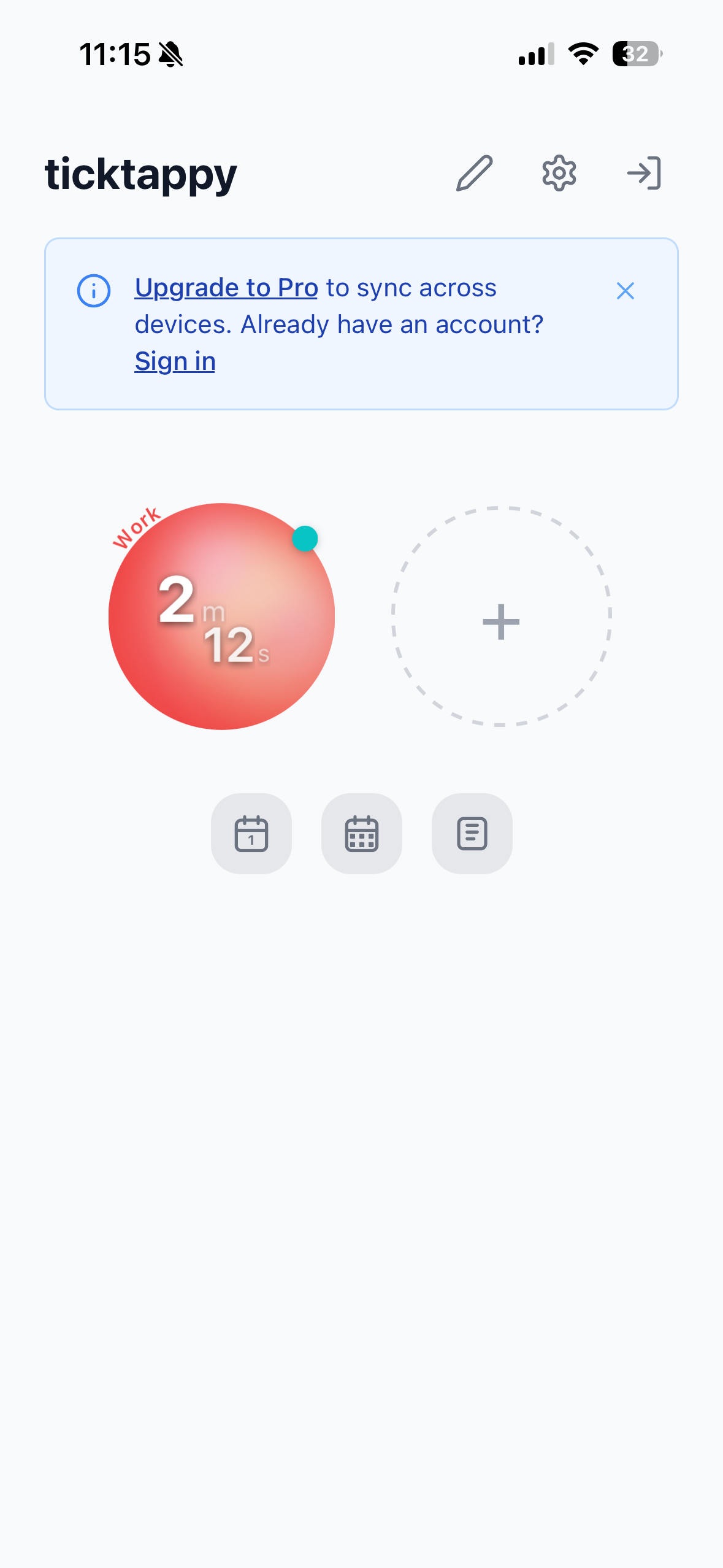
Time tracking shouldn't feel like a chore. But for freelancers, developers, and solo entrepreneurs, most time trackers feel designed for enterprise teams—filled with mandatory fields, complex categorization, and overwhelming dashboards.
TickTappy takes a completely different approach. This minimalist time tracking app is built for individuals, not teams. With one-tap tracking, colorful tags, and clean summaries, it's designed for people who value simplicity over complexity.
The result? Time tracking that just works—in seconds, not minutes.
What makes this Review compelling is its focus on simplicity and privacy. Built by a solo developer as a privacy-first indie app, TickTappy offers native apps for iPhone, iPad, Mac, Apple Watch, Android, and web—without ads, without data selling, and without the overwhelming complexity of enterprise solutions like Toggl, Clockify, or Harvest.
In this review, we'll explore how TickTappy helps freelancers, developers, and students track their time without the overhead.
The Problem TickTappy Solves
Traditional time tracking approaches have several frustrating limitations:
- Overwhelming Complexity: Enterprise time trackers require project selection, team assignment, detailed descriptions, and mandatory categorization before you can even start a timer
- Account Requirements: Most apps force you to create an account and sign in just to track time
- Data Privacy Concerns: Enterprise solutions often sell data or use it for advertising, raising privacy concerns for sensitive client work
- Expensive Pricing: Many platforms charge monthly fees for features freelancers don't need
- Learning Curve: Complex interfaces and overwhelming dashboards take time to learn and use effectively
- No Offline Support: Web-based solutions stop working without an internet connection
TickTappy addresses these pain points with a radical focus on simplicity—helping anyone track time without friction, overhead, or privacy concerns.
Core Features Explained: The Heart of Our Review
One-Tap Time Tracking
One-tap tracking is the centerpiece of TickTappy's experience.
How One-Tap Tracking Works
Tracking time takes just two simple steps:
- Create Colorful Tags: Set up unlimited project tags with your preferred colors
- Tap to Start/Stop: Tap a tag circle to start tracking, tap again to stop
The beauty is in its simplicity. No selecting projects from dropdown menus, no filling out mandatory forms, no forced categorization. Just tap and go.
Intelligent Timer Management
TickTappy includes smart features that enhance the one-tap experience:
- One Timer at a Time: When you switch to another tag, TickTappy automatically stops the previous timer (unless you pin it)
- Optional Pinned Background Timers: Keep certain timers running in the background while you switch between others
- Quick Time Adjustment: Fix "oops" moments instantly by adjusting time right after you start/stop
- Start Retroactively: Start tracking for past sessions (e.g., "started 30 min ago")
This intelligent automation means you never have to worry about multiple timers running simultaneously or forgetting to stop one before starting another.
Ideal for: Freelancers, developers, and anyone who wants time tracking that doesn't interrupt their workflow.
Cross-Platform Native Apps
TickTappy offers true native apps across multiple platforms, not web-based wrappers.
Platform Coverage
- iPhone & iPad: Fully native iOS apps designed specifically for Apple's touch interface
- Mac: Native Mac app with keyboard shortcuts and desktop-optimized experience
- Apple Watch: Complete watch app with complications so your timer is always one tap away
- Android: Native Android app for non-Apple users
- Web: Progressive web app accessible from any browser
Apple Ecosystem Integration
TickTappy goes deep with Apple platform features:
- Home Screen Widgets: Small and Medium widgets with interactive tag circles
- Live Activity: Running timer visible on Lock Screen and Dynamic Island
- Control Center Widget: Quick access from Control Center (iOS 18+)
- Apple Watch Complications: Your timer is always visible on your wrist
This native-first approach means smooth performance, offline capability, and seamless integration with each platform's unique features.
Color-Coded Tag System
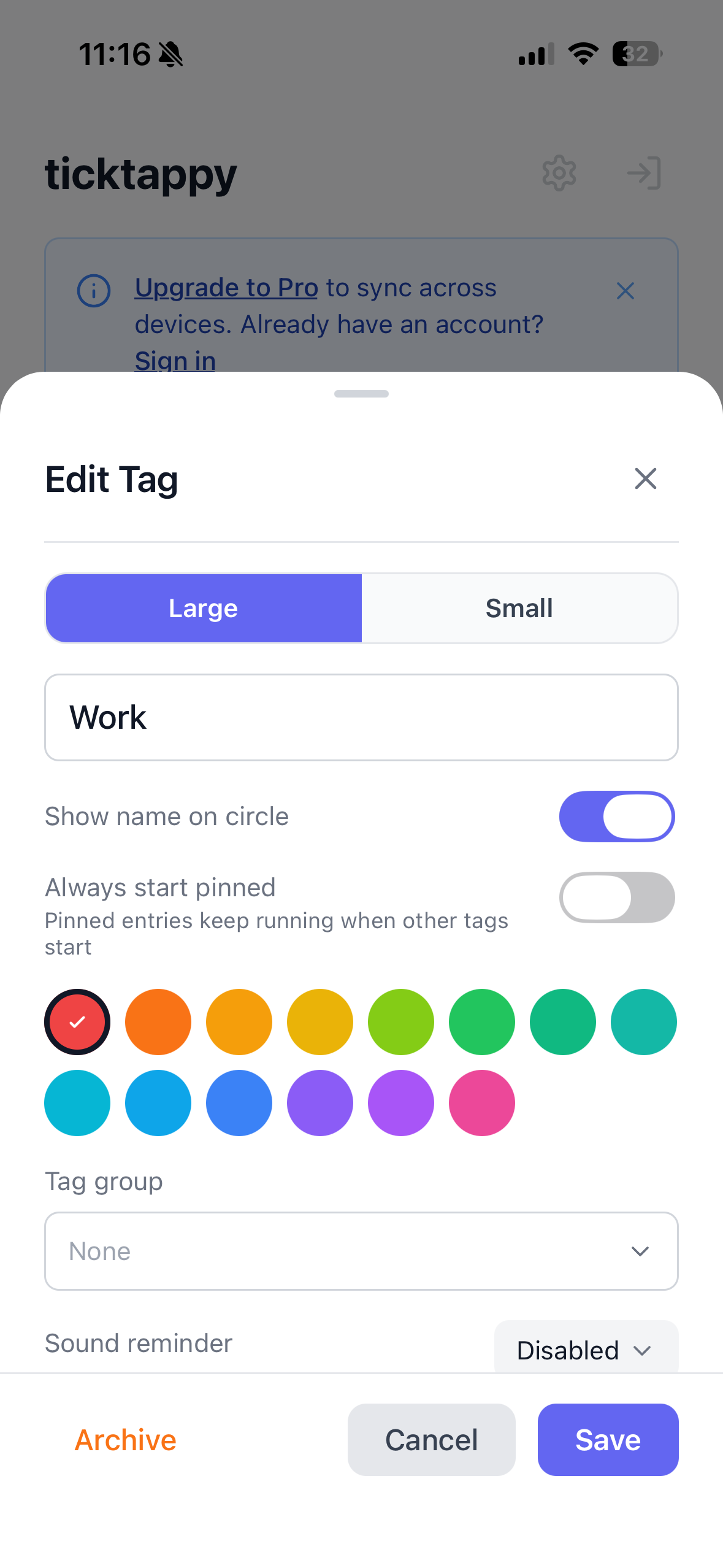
Organize your work with unlimited, color-coded tags that make time tracking visual and intuitive.
Tag Management Features
- Unlimited Tags: Create as many tags as you need for different projects, clients, or activities
- Color Coding: Assign colors to tags for instant visual recognition
- Tag Groups: Organize tags into logical groups for better organization
- Drag & Drop Reordering: Arrange tags in the order that makes sense to you
- Archive Tags: Archive tags you're not using without losing historical data
- Optional Sound Reminders: Set sound reminders per tag to stay on track
The visual color coding makes it easy to scan and see where your time is going at a glance.
Clean Day and Week Summaries
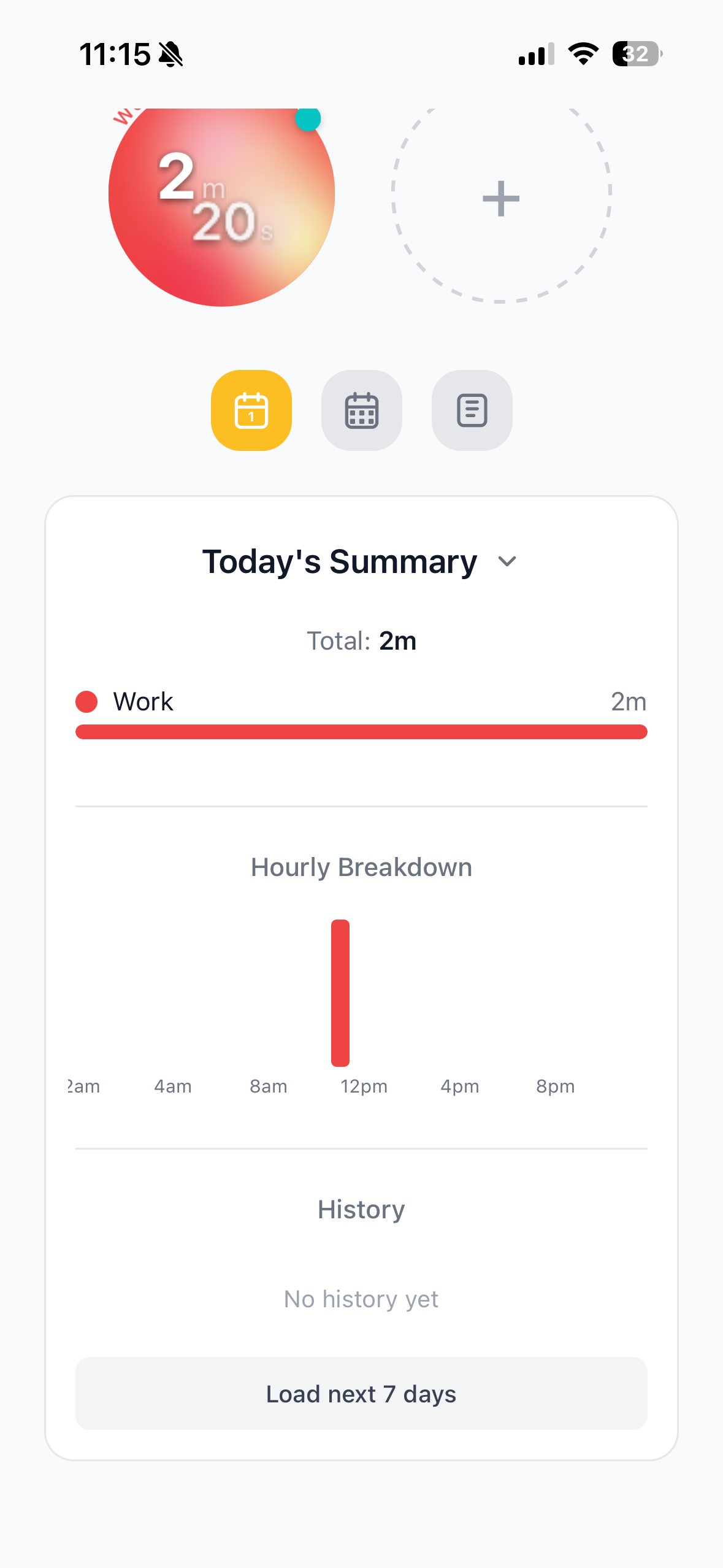
See where your time goes with simple, clean summaries—no overwhelming dashboards or complex reports.
Summary Views
- Day Summary: View your day's time breakdown by tag with progress bars
- Week Summary: See weekly patterns with bar charts showing time per project
- Time Breakdowns: Clear visual representations of how you spent your time
Entry Management
Full control over your tracked time:
- View Past Entries: See all your tracked time entries
- Edit Entries: Correct mistakes or add missing details
- Delete Entries: Remove entries you don't need
The summaries are designed to provide insights without overwhelming you with data. You get a clear picture of where your time goes without the complexity of enterprise reporting.
Pricing Plans: Free Core with Premium Sync
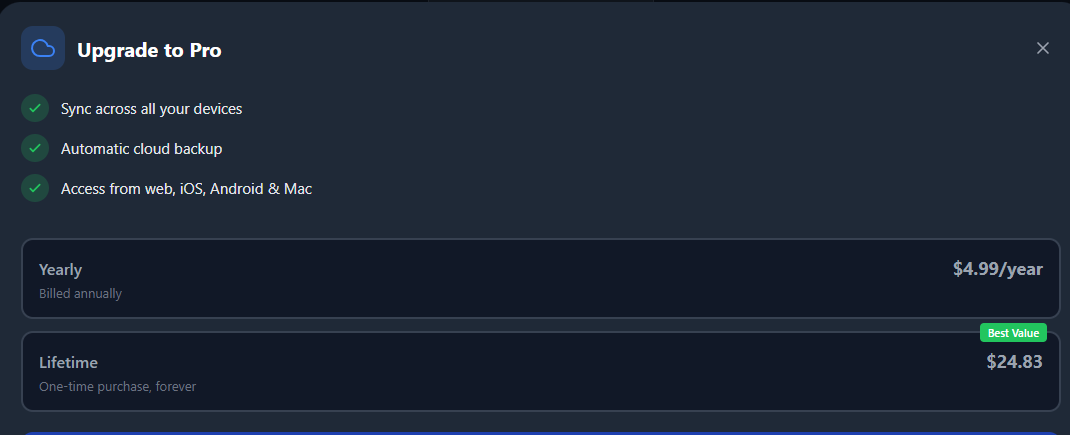
TickTappy makes time tracking accessible with a generous free tier and affordable premium sync.
Free Tier: Local Time Tracking
Perfect for single-device users:
- Price: Completely free
- Account: No account required
- Features Included:
- One-tap time tracking
- Unlimited color-coded tags
- Day and week summaries
- All platform apps
- Offline tracking
- Local storage
Premium Tier: Cross-Device Sync
For users who need their data everywhere:
- Premium Yearly: $4.99/year
- Premium Lifetime: $24.83 one-time payment
- Features: Everything in Free Tier, plus:
- Cloud sync across all devices
- Keep tags and entries synced
- Access your data on any device
At $4.99/year or a one-time $24.83 lifetime payment, Premium sync is incredibly affordable compared to monthly subscriptions from competitors that charge $10-20/month. The lifetime option pays for itself in just 1.25 years compared to yearly billing.
System Requirements
- Account: Optional—create an account for Premium sync, not required for free use
- Internet Connection: Required for web app and sync—apps work offline
- Storage: Local storage on device for free tier, cloud storage for Premium
How to Start Tracking with TickTappy
Getting started with TickTappy is simple and intuitive:
- Download the App: Get TickTappy from the App Store, Google Play, Mac App Store, or visit ticktappy.com
- Create Your First Tag: Set up a colorful tag for your first project
- Tap to Start Tracking: Tap your tag to begin timing
- Tap Again to Stop: Tap again when you're done
- View Your Summaries: Check your day and week summaries to see where your time goes
- Upgrade to Premium (Optional): Get cross-device sync (see Pricing Plans below)
The entire process takes minutes, and there's no account required to start tracking.
How TickTappy Stands Out From Competitors
TickTappy differentiates itself with a radical focus on simplicity and individual users rather than teams.
Key Differentiators
- True One-Tap Tracking: No mandatory fields, no forms—just tap and go
- Individual-Focused Design: Built for solo users, not teams or enterprises
- Privacy-First Approach: No ads, no data selling, indie-made transparency
- Offline-First Architecture: Track anywhere without internet
- Affordable Pricing: Premium sync at $4.99/year or $24.83 lifetime
- Native Apps Across Platforms: True native experiences, not web wrappers
- No Account Required: Start tracking immediately without sign-up
- Clean Summaries: Simple views, not overwhelming dashboards
Competitive Analysis
Different time tracking apps take varying approaches to helping users track their time.
| Feature | TickTappy | Toggl | Clockify |
|---|---|---|---|
| One-Tap Tracking | ✅ Yes | ❌ No | ❌ No |
| Mandatory Fields | ✅ None | ✅ Required | ✅ Required |
| Account Required | ✅ No | ✅ Yes | ✅ Yes |
| Privacy-First | ✅ Yes | ⚠️ Enterprise Focus | ⚠️ Enterprise Focus |
| Offline Support | ✅ Full | ⚠️ Limited | ❌ No |
| Native Apps | ✅ All Platforms | ✅ Mobile + Web | ✅ Web + Mobile |
| Pricing Model | ✅ Free + $4.99/yr or $24.83 lifetime | ✅ Free + Paid | ✅ Free + Paid |
| Clean Summaries | ✅ Yes | ⚠️ Complex | ⚠️ Complex |
| Team Focus | ❌ Individual Only | ✅ Teams First | ✅ Teams First |
Perfect For: Who Uses TickTappy?
TickTappy is designed for individuals aged 22-45 across tech, design, consulting, and education who've grown frustrated with complex time trackers.
Freelancers & Consultants managing 3-5 client projects often find tools like Toggl or Harvest overkill for solo work—they need something simpler for tracking billable hours.
Software Developers working on side projects, open source, or client work use TickTappy to track deep work versus meetings and optimize their schedules.
Students building better focus habits rely on TickTappy to track study sessions and understand where their time goes.
Solo Entrepreneurs & Indie Hackers juggling multiple projects appreciate managing everything without the overhead of team-focused tools designed for larger organizations.
Anyone curious about their daily time distribution can benefit—whether you're tracking work, personal projects, or just understanding your habits.
What these users share in common? They value simplicity. Most have tried and abandoned more complex time trackers, seeking insights without the overhead. Their interests lean toward productivity, minimalism, indie software, self-improvement, and remote work. While TickTappy supports multiple platforms, it's particularly embraced by the Apple ecosystem—iPhone, iPad, and Mac users who want a native experience that respects their time.
Final Review Verdict: Is TickTappy Worth It?
After thoroughly exploring TickTappy, it's clear this minimalist time tracking app fills a crucial gap in the market. Unlike enterprise solutions designed for teams, TickTappy is built for individuals who value simplicity over complexity.
What impressed me most was the commitment to the one-tap philosophy. No mandatory fields, no forms, no complexity—just tap a tag and start tracking. The color-coded tags, clean summaries, and cross-platform native apps create a complete time tracking experience that respects your time and attention.
The free tier removes all barriers—you can start tracking immediately without creating an account. Premium sync is incredibly affordable, especially compared to competitors charging $10-20/month for features most freelancers don't need.
This time tracking app is particularly valuable for freelancers, developers, students, and anyone who finds enterprise time trackers too complex for solo work.
Review Summary
- Ease of Use: ⭐⭐⭐⭐⭐ (5/5)
- Time to Start Tracking: ⭐⭐⭐⭐⭐ (5/5)
- Simplicity: ⭐⭐⭐⭐⭐ (5/5)
- Cross-Platform Support: ⭐⭐⭐⭐⭐ (5/5)
- Offline Capability: ⭐⭐⭐⭐⭐ (5/5)
- Value for Money: ⭐⭐⭐⭐⭐ (5/5)
- Privacy: ⭐⭐⭐⭐⭐ (5/5)
- Overall Review Score: ⭐⭐⭐⭐⭐ (5/5)
Ready to simplify your time tracking? 👉 Try TickTappy for Free today. Experience one-tap time tracking that just works—built for people who hate complex time trackers.
Tags
# Review# time tracking app# simple time tracker# minimalist time tracking# freelance time tracker# one-tap time tracking# best simple time tracking app for freelancers# easy time tracker for iPhone and Mac# minimalist alternative to Toggl# time tracking app for people who hate time trackingJam SQL Studio Review - AI-Native Cross-Platform SQL IDE for Mac, Windows, and Linux
AI Invitation Maker by Greetings Island Review - Create Stunning Event Invites in Seconds
Follow for new blogs
Subscribe to our blog
Subscribe to Newsletter
Subscribe to our newsletter to get the best products weekly.