ConferenceGrid Review - See Every Conference a Company Touches
Welcome to our ConferenceGrid review!
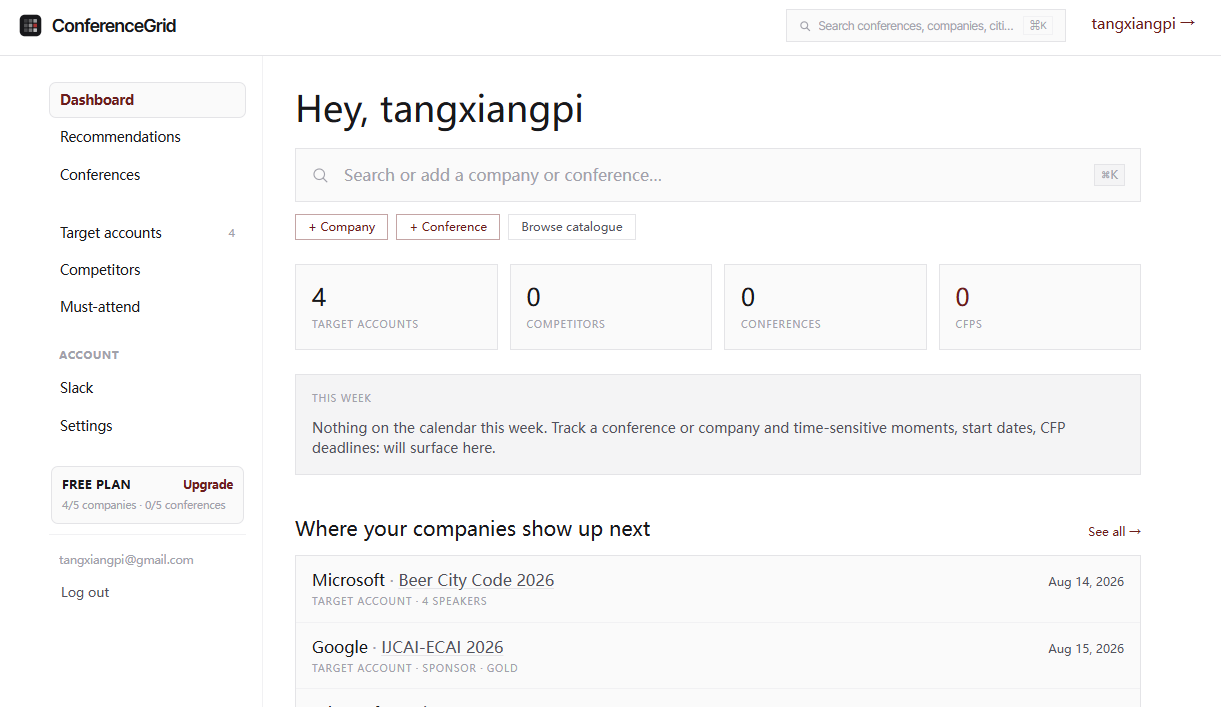
If you have ever tried to figure out which conferences a company actually attends, you know how painful it can be. You check the website, then the speaker list, then the sponsor page, and you still end up guessing. ConferenceGrid was built to end that guessing. It is a B2B conference intelligence database that tracks the event footprint of companies around the world, and this ConferenceGrid review will walk you through exactly how it works and whether it is worth your budget.
Let's dig into this conference intelligence platform and see what it really offers.
ConferenceGrid is a conference database designed for B2B teams. Its tagline says it all: "See every conference a company touches." The platform currently tracks 3,551 conferences, 111,446 companies, and 97,312 speakers across 66,814 agenda sessions, spanning 1,112 cities in 125 countries. It records who speaks, who sponsors, and who exhibits at each event, so you can quickly understand where your prospects, partners, and competitors show up in person.
The Problem ConferenceGrid Solves
Conference intelligence is surprisingly hard to gather by hand, and most teams hit the same walls:
- Scattered Data: Speaker lists, sponsor pages, and exhibitor directories live in different places for every single event
- Outdated Information: By the time you find a conference listing, the speaker list has already changed
- Manual Research: Pulling together a competitor's event calendar takes hours of clicking through individual conference sites
- Missed Deadlines: CFP and sponsorship deadlines slip by because nobody has a single view of them
- No Company View: Most directories organize events by event, not by the company footprint across many events
- Hidden Opportunities: Sponsorship and speaking chances get overlooked because there is no way to spot them all at once
ConferenceGrid attacks these problems with one focused goal: give you a complete, continuously updated map of which companies touch which conferences. Instead of stitching together spreadsheets from event sites, you get a searchable database where the data is already linked.
Why Choose ConferenceGrid?
- 🗂️ Massive Event Coverage: 3,551 conferences tracked and growing, updated continuously
- 🏢 Deep Company Intelligence: 111,446 companies with their conference footprint in one view
- 🎤 Speaker-Level Data: 97,312 speakers indexed across events and agenda sessions
- 🌍 Global Reach: Events tracked across 1,112 cities in 125 countries
- 📊 Sponsorship Opportunities: Recommendations sorted by fit, not by who pays a referral fee
- ⏰ CFP Deadline Alerts: Never miss a call for papers deadline again
- 📅 Calendar Sync: Push conferences and deadlines to Google, Apple, or Outlook calendars
- 🧩 Slack Integration: Get event alerts straight in your Slack workspace
- 🎯 Company Activity Rankings: See which companies appear at the most events, from Microsoft to startups
- 🔎 Category & City Browsing: Filter by 12+ technology categories and 287 cities
Core Features Explained: The Heart of Our Review
The Conference Database
Live, Continuously Updated Data
The core of ConferenceGrid is its database of 3,551 ongoing conferences. The team keeps it updated continuously, so the speaker, sponsor, and exhibitor records reflect what is actually happening rather than what was true months ago.
The breadth matters more than you might think. When you are scouting where to spend your marketing budget, knowing that a category has hundreds of active events changes your planning entirely. For example, the database indexes 728 technology conferences, 513 AI and Machine Learning events, 288 cybersecurity conferences, and 206 Manufacturing & Industrial events, plus several other categories that take the total past twelve.
You can also browse by city. London alone has 160 tracked conferences, Dubai has 99, New York has 84, and Berlin has 81. If your target customers concentrate in specific hubs, this city-level view helps you prioritize where to be.
Speakers, Sponsors, and Exhibitors
For every conference, ConferenceGrid records the three groups that matter most to a B2B strategy:
- Speakers: who is on stage, which makes it easier to find the right people to connect with
- Sponsors: which companies are backing the event financially
- Exhibitors: which companies paid for booth space or a speaking slot
This structured breakdown is what separates ConferenceGrid from a plain event calendar. You are not just seeing that an event exists; you are seeing who is participating and at what level.
Ideal for: Sales teams researching accounts, marketers planning event presence, and BD reps hunting for partnership opportunities.
Company Tracking
See Every Conference a Company Touches
This is the headline feature, and it is where ConferenceGrid shines. Add a company to your watchlist and you get a unified view of every conference that company has spoken at, sponsored, or exhibited in. That single view is gold for competitive intelligence.
Say your biggest competitor exhibits at a trade show you had never heard of. With company tracking, that gap becomes obvious. You can see their event footprint at a glance and decide whether you need to be there too.
Company Activity Rankings
The platform also ranks companies by how often they appear at conferences. Right now, Microsoft tops the list at 653 conferences, Google follows at 547, AWS appears at 522, and IBM is tracked at 330 events. These rankings make it easy to see which industry leaders treat live events as a serious channel, which is useful context when you are benchmarking your own strategy.
Ideal for: Competitive research, account-based marketing, and any team that needs to know where the market actually shows up.
Open Calls and CFP Deadlines
Never Miss a Submission Window
One of the most practical features in this ConferenceGrid review is the open calls section. ConferenceGrid surfaces conferences that are currently accepting submissions, complete with their deadlines. Examples like MAGWest 2026, PyDay Boyacá, and CloudCon Sydney 2026 show the range of active calls at any given time.
For speakers and thought leaders, this is a serious timesaver. Instead of hunting across dozens of event websites to find which ones are open for proposals, you get a running list of live CFPs with their deadlines attached.
Deadline Alerts
The platform ties these deadlines into its alert system. You can set up notifications so a CFP cutoff or a sponsorship deadline does not sneak past you. Combined with the Slack app, this turns a database into an active assistant rather than a static directory.
Ideal for: Speakers, conference organizers, and teams that want to get in front of the right audiences.
Calendar and Slack Integration
Sync to the Calendars You Already Use
ConferenceGrid lets you subscribe to conference feeds and CFP deadlines directly on your existing calendar. You can sync specific categories of events to Google, Apple, or Outlook, so the relevant conferences show up alongside your normal schedule.
Slack Alerts
For teams that live in Slack, the platform pushes event updates and deadline reminders right into your workspace. This keeps conference intelligence in the flow of work instead of forcing people to log into yet another dashboard.
Ideal for: Distributed teams, event coordinators, and anyone who prefers alerts in the tools they already open every day.
Subscription Plans: Simple, Transparent Pricing
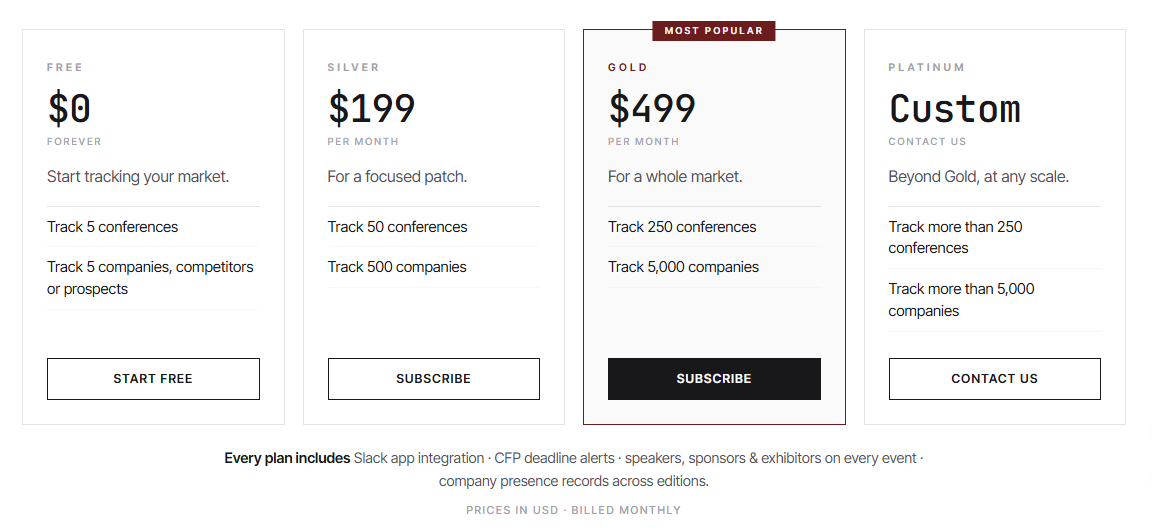
ConferenceGrid keeps its pricing straightforward. Every plan shares the same set of tools; the difference comes down to how many conferences and companies you can track.
Start free and track your companies. All plans include the core feature set, with no hidden costs from referral fees.
Free Plan: $0
A permanent free tier, not just a trial. You get:
- Track up to 5 conferences
- Track up to 5 companies (competitors or prospects)
- Slack app integration
- CFP deadline alerts
- Speaker, sponsor, and exhibitor records
- Company exhibit history view
- Sponsorship opportunity recommendations
The idea behind the free plan is to let you validate the value on the accounts that actually matter before you decide to upgrade.
Silver Plan: $199/month - Most Popular
The most popular plan on the platform, and a good fit for teams focusing on a specific niche or market segment.
- Track up to 50 conferences
- Track up to 500 companies
- Everything included in the Free plan
Gold Plan: $499/month
Built for teams that need to cover an entire market.
- Track up to 250 conferences
- Track up to 5,000 companies
- Everything in Silver, plus higher tracking limits
Platinum Plan: Custom Pricing
For enterprise-scale needs that exceed standard limits.
- Track more than 250 conferences
- Track more than 5,000 companies
- Volume pricing
- Invoicing support
- Direct contact channel
- Custom plan delivered within 1 to 2 days
One thing worth calling out in this ConferenceGrid review: the platform confirms whether a company is actually exhibiting (booth or speaking slot), and it does not promise attendance numbers. It also notes that organizers may pay a referral fee, but that fee does not affect what you pay.
Questions? Use the contact form on the pricing page to pick a plan and get set up, or reach out for a custom Platinum quote.
How to Get Started with ConferenceGrid
Getting started follows the classic free-first pattern, which is refreshingly low risk.
STEP 01: Create a Free Account Sign up directly on the website and you are in. No sales call required to start testing.
STEP 02: Add Your First Companies Add up to five companies you care about, whether they are competitors, prospects, or partners. ConferenceGrid will pull together their conference footprint.
STEP 03: Explore the Database Browse conferences by category or city, check open calls, and look at who speaks, sponsors, and exhibits where.
STEP 04: Set Up Alerts and Calendar Enable Slack alerts and subscribe to relevant conference feeds in your calendar so deadlines come to you instead of the other way around.
STEP 05: Upgrade When It Makes Sense Once you have seen the value on the free plan, pick a paid tier that matches your tracking volume.
How ConferenceGrid Stands Out From Competitors
ConferenceGrid differentiates itself by focusing squarely on the company-to-conference connection. Many directories index events, but few give you a reverse lookup that shows every conference a specific company touches. Add in speaker, sponsor, and exhibitor breakdowns, live CFP deadlines, Slack alerts, and calendar sync, and you have a tool built for active go-to-market planning rather than passive browsing.
The transparency around sponsorship recommendations is also worth noting. ConferenceGrid sorts opportunities by fit rather than by who paid a referral fee, and it says so openly. That is a meaningful trust signal in a space where recommendation quality often depends on hidden incentives.
Perfect For: Who Uses ConferenceGrid?
ConferenceGrid is aimed at B2B teams that need to make smart decisions about where to show up in person. Sales teams use it to see which events their prospects attend. Marketers use it to find sponsorship and speaking slots that match their audience. BD and partnerships teams use it to track where competitors are investing their event dollars. And speakers use the open calls feed to find live CFP opportunities with deadlines.
In short, if understanding the live-event landscape is part of your job, ConferenceGrid gives you a single place to do it.
Review Summary
- Ease of Use: ⭐⭐⭐⭐⭐ (5/5)
- Database Coverage: ⭐⭐⭐⭐⭐ (5/5)
- Company Tracking: ⭐⭐⭐⭐⭐ (5/5)
- CFP & Deadline Alerts: ⭐⭐⭐⭐⭐ (5/5)
- Integration Options: ⭐⭐⭐⭐ (4/5)
- Sponsorship Fit: ⭐⭐⭐⭐ (4/5)
- Value for Money: ⭐⭐⭐⭐ (4/5)
- Pricing Transparency: ⭐⭐⭐⭐⭐ (5/5)
- Customer Support: ⭐⭐⭐⭐ (4/5)
- Overall Review Score: ⭐⭐⭐⭐⭐ (4.6/5)
Ready to see every conference your market touches? 👉 Start free on ConferenceGrid and add your first companies today. The free plan is permanent, so there is no risk in testing whether conference intelligence makes your next event decision easier.
Tags
# Review# ConferenceGrid# ConferenceGrid Review# conference intelligence# B2B events# conference database# industry events# event sponsorship# speaking opportunities# competitive intelligence# conference tracking# sales prospecting# marketing research# CFP deadlines# sponsor leads# exhibitor tracking# event strategy# conference agenda# speaker database# B2B sales toolsMentionBird Review - AI Visibility Tracking With a Fix Plan
PhotoLog Review - Searchable GPS Camera Notes for Field Documentation
Follow for new blogs
Subscribe to our blog
Subscribe to Newsletter
Subscribe to our newsletter to get the best products weekly.